
How to find the keywords for SEO (step by step)
How to Get the Best Keywords for SEO: A Step-by-Step Guide
Written by Kirsty Wright, founder of Co Thought Digital
Published 7th February, 2026
Whether you’re building a new website, writing blog content or improving your existing pages, choosing the right keywords is one of the most important parts of any SEO strategy.
Many businesses make the same mistake, they target keywords with the highest search volume and wonder why they’re not generating enquiries. The reality is that successful SEO isn’t about attracting the most visitors; it’s about attracting the right visitors.
That’s where keyword research comes in.
By learning how to get the best keywords for SEO, you’ll understand exactly what your audience is searching for, what questions they need answered, and which keywords are worth targeting to grow your website organically.
In this guide, we’ll walk you through our step-by-step keyword research process, explain how to choose keywords that match user intent, and show you how to build topical authority that both Google and AI search tools trust.
What Are SEO Keywords?
SEO keywords are the words and phrases people type into search engines when they’re looking for information, products or services.
For example, someone looking for a local web designer might search for:
- ● web design Bristol
- ● affordable website designer
- ● WordPress web designer
- ● website design for small business
Each of these represents a different keyword with a different level of competition and search intent.
The goal of keyword research isn’t simply finding popular searches. It’s identifying keywords that:
- ● Match what your audience is searching for
- ● Have realistic competition
- ● Fit your business goals
- ● Can generate enquiries or sales
- ● Help build your website’s authority
Think of keywords as the bridge between your customers’ questions and your content.
Why Keyword Research Matters
Without keyword research, you’re creating content based on what you think people want.
With keyword research, you’re creating content based on what people are already searching for.
That difference can dramatically improve your SEO results.
Good keyword research helps you:
● Increase organic traffic
● Attract qualified visitors
● Improve Google rankings
● Discover new content ideas
● Build topical authority
● Understand customer intent
● Stay ahead of competitors
It also prevents one of the biggest SEO mistakes: spending hours writing content nobody is searching for.
Understanding Search Intent Before Choosing Keywords
One of the biggest ranking factors today isn’t the keyword itself – it’s search intent.
Google wants to show pages that best satisfy what the searcher is trying to achieve.
Before choosing any keyword, ask yourself:
Why is someone searching this phrase?
Most searches fall into four categories.
Informational Intent
The user wants to learn something.
Examples include:
● how to get best keywords for SEO
● what is keyword research
● SEO tips for beginners
These are perfect for blog articles and guides.
Navigational Intent
The user already knows where they want to go.
Examples include:
● Google Search Console
● WordPress login
● Co Thought Digital
These searches rarely need targeting unless it’s your own brand.
Commercial Intent
The user is comparing options before making a decision.
Examples include:
● best SEO agency
● SEO software comparison
● best keyword research tool
These visitors are much closer to becoming customers.
Transactional Intent
The user is ready to take action.
Examples include:
● hire SEO consultant
● SEO services Bristol
● website SEO audit
These keywords often have
lower search volume but much higher conversion rates.
Top Tip: Don’t choose keywords based solely on search volume. A keyword with 100 monthly searches that generates five enquiries is often far more valuable than one with 5,000 searches that generates none.
Start 1: Start With Seed Keywords
Every successful keyword strategy starts with a handful of seed keywords.
Seed keywords are broad topics directly related to your business.
If you own a digital marketing agency, your seed keywords might include:
● SEO
● Local SEO
● Website design
● Google Business Profile
● Content marketing
● AI search
● Keyword research
These broad terms act as the starting point for discovering hundreds of related keyword opportunities.
Don’t overthink this stage.
Simply write down every product, service and problem your customers might search for.
A simple exercise is to answer these questions:
● What services do we offer?
● What problems do we solve?
● What questions do customers ask?
● What words would customers use instead of industry jargon?
● What pages already exist on our website?
You should end up with a list of 20–50 broad keyword ideas.
Think Like Your Customer
One of the easiest ways to find great keywords is to stop thinking like a marketer.
Think like your customer instead.
Imagine you’re searching for your own business online.
Would you search for:
“Enterprise digital transformation consultancy”
Or
“Website designer for small business”
Most people search using simple, everyday language.
That’s exactly how your keywords should sound.
If you’re struggling for ideas, download the free guide to find the exact places to uncover keyword ideas.
Step 2: Expand Your Keyword List Using Research Tools
Once you’ve created your list of seed keywords, it’s time to discover the hundreds of related searches your audience is making.
The goal isn’t to collect as many keywords as possible. It’s to uncover the searches that match your customers’ needs and your business goals.
There are plenty of keyword research tools available, but remember: tools provide data, not strategy. A good SEO strategy comes from interpreting that data correctly.
If you’re struggling for ideas, download the free guide to find the exact places to uncover keyword ideas.
Paid Keyword Research Tools
As your SEO strategy grows, investing in a dedicated keyword research tool can save time and uncover deeper insights.
Popular options include:
● Semrush
● Ahrefs
● SE Ranking
● Moz
● Ubersuggest
● Mangools
Most provide similar metrics, including:
● Monthly search volume
● Keyword difficulty
● Search intent
● Related keywords
● Competitor rankings
● SERP features
●Backlink data
Don’t become obsessed with one tool’s numbers. Different platforms estimate search volume differently, so treat the data as guidance rather than absolute fact.
Step 3: Look Beyond Search Volume
One of the biggest mistakes beginners make is choosing keywords purely because they have high search volumes.
More searches don’t automatically mean better SEO opportunities.
Imagine you’re deciding between these keywords:
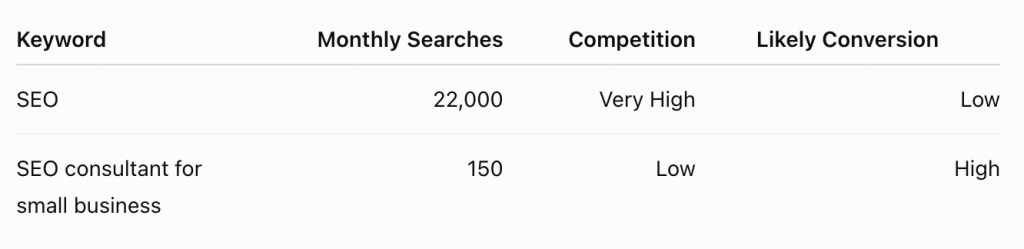
Which would you rather rank for?
The second keyword may attract fewer visitors, but those visitors know exactly what they need and are much closer to becoming customers.
The best keywords balance three factors:
● They are relevant to your business.
● They have achievable competition.
● They attract visitors with genuine buying or enquiry intent.
That’s far more valuable than chasing high-volume vanity keywords.
Step 4: Find Low-Competition Keywords
If your website is new or still building authority, targeting broad competitive keywords is unlikely to deliver quick results.
Instead, focus on long-tail keywords.
Long-tail keywords are longer, more specific search phrases that usually have:
● Lower competition
● Higher conversion rates
● Clearer search intent
● Easier ranking opportunities
For example:
Instead of targeting:
SEO
Target:
● SEO for accountants
● SEO for estate agents
● SEO for charities
● SEO checklist for small businesses
● How to get best keywords for SEO
● Local SEO tips for cafés
Although these keywords have lower search volumes individually, together they can drive significant qualified traffic.
Many successful SEO strategies are built by ranking for dozens of long-tail keywords rather than a handful of highly competitive terms.
Step 5: Analyse Your Competitors
Your competitors have already done some of the hard work for you.
By analysing the keywords they rank for, you can identify opportunities to improve your own content.
Start by searching your main keyword on Google.
Ask yourself:
● Who appears on page one?
● What topics do they cover?
● How detailed are their articles?
● What questions are they answering?
● What information is missing?
The goal isn’t to copy their content. It’s to create something more useful, more comprehensive and more up to date.
A simple way to do this is by identifying content gaps.
For example, you might notice that most keyword research articles explain how to find keywords but don’t show readers how to organise them into a practical content strategy.
That gap becomes your opportunity to add unique value.
Step 6: Prioritise Keywords That Match Your Goals
Not every keyword deserves its own page.
Before you start writing, ask:
● Does this keyword align with my services?
● Will it attract my ideal customer?
● Can I create the best resource on this topic?
● Does it fit naturally within my existing content?
A useful way to prioritise keywords is by considering both business value and ranking potential.
High Priority
● Strong commercial intent
● Relevant to your services
● Realistic competition
● Supports your business goals
Medium Priority
● Good informational content
● Builds authority
● Links naturally to service pages
Low Priority
● High search volume but little relevance
● Difficult to rank for
● Unlikely to generate enquiries
Remember, your goal isn’t simply to increase traffic. It’s to attract visitors who are likely to become customers.
Step 7: Group Your Keywords into Topic Clusters
Finding keywords is only the beginning. The next step is organising them into topic clusters.
A topic cluster is a group of closely related keywords centred around one main subject. Instead of creating separate articles for every variation, you build one comprehensive page that covers the topic in depth and supports it with related content.
For example, your primary keyword might be:
How to get the best keywords for SEO
Supporting keywords could include:
● How to find SEO keywords
● Keyword research for beginners
● Free keyword research tools
● Long-tail keywords
● Search intent
● Keyword difficulty
● Search volume
● Topic clusters
● Keyword mapping
Rather than writing nine short blog posts, create one authoritative guide that answers all of these questions naturally.
This approach helps Google understand that your page comprehensively covers the topic, increasing its chances of ranking for a wide range of related searches.
If a keyword:
● Perfectly matches your audience,
● Answers a genuine question,
● And aligns with your services,
it’s often worth creating content around it, even if your keyword tool reports zero searches.
Some of the highest-converting pages we see target highly specific questions that barely register in keyword tools but consistently attract qualified visitors.
Step 7: Group Your Keywords into Topic Clusters
Google no longer ranks pages based solely on keyword usage. It increasingly rewards websites that demonstrate expertise across an entire subject.
This is known as topical authority.
Instead of publishing dozens of unrelated blog posts, focus on becoming the go-to resource within your niche.
For example, if your business provides SEO services, your content could cover topics such as:
● Keyword research
● On-page SEO
● Technical SEO
● Local SEO
● Link building
● Content marketing
● AI search optimisation
● Google Business Profile
● SEO audits
Each article should link naturally to the others, creating a strong content hub that reinforces your expertise.
Think of your website as a library. A single excellent book is useful, but a well-organised collection on the same subject is far more authoritative.
Step 8: Map Keywords to the Right Pages
One common SEO mistake is trying to rank multiple pages for the same keyword.
This can confuse search engines and make it harder for any of those pages to perform well.
This issue is often referred to as keyword cannibalisation.
Instead, assign one primary keyword to each page and support it with closely related secondary keywords.
For example:
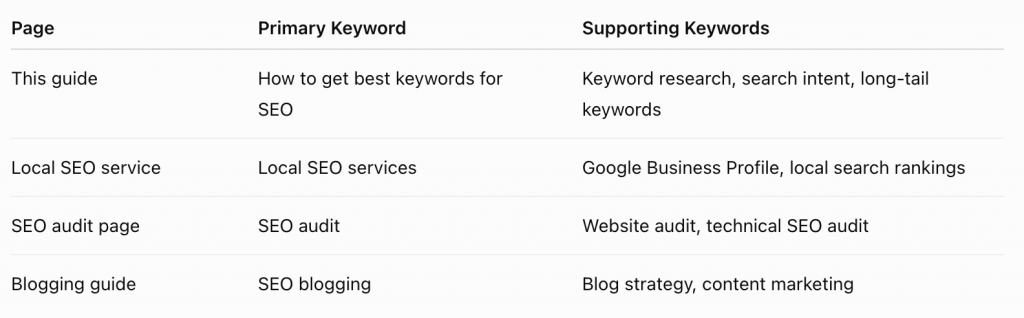
This keeps your content focused and helps search engines understand which page should rank for each topic.
Step 9: Optimise Your Content Naturally
Once you’ve chosen your keywords, it’s time to incorporate them into your content, but naturally.
Keyword stuffing is outdated and can make your writing difficult to read.
Instead, include your primary keyword in key places, such as:
● The page title
● The H1 heading
● The first paragraph
● At least one H2 heading
● The meta description
● The URL (where appropriate)
● Image alt text
● The conclusion
Then use related keywords and natural language throughout the article.
For example, if your primary keyword is how to get best keywords for SEO, it’s perfectly natural to also use phrases like:
● keyword research strategy
● finding SEO keywords
● choosing the right keywords
● search intent
● keyword opportunities
This helps search engines understand the broader topic without making the content repetitive.
How AI Search Is Changing Keyword Research
Search is evolving.
People are no longer searching only with short phrases. They’re asking detailed questions using conversational language through tools like ChatGPT, Google’s AI Overviews and other AI-powered search experiences.
Instead of searching:
“SEO keywords”
Users now ask:
“How do I find the best keywords for my small business website?”
Or:
“What keywords should a local business target for SEO?”
This shift means your content should answer complete questions rather than simply target isolated keywords.
To future-proof your SEO:
● Write naturally and conversationally.
● Answer related questions within the same article.
● Include practical examples.
● Demonstrate real experience.
● Cover the topic comprehensively.
Content that genuinely helps readers is more likely to be referenced by AI search tools and earn visibility beyond traditional search results.
Build Content Around Problems, Not Just Keywords
Many businesses start with a keyword and then write an article.
A more effective approach is to start with your customers’ problems.
For example:
Customer problem:
“My website isn’t getting any traffic.”
Possible content ideas include:
● Why your website isn’t ranking on Google
● How to get the best keywords for SEO
● Common SEO mistakes
● How to improve website visibility
● What is search intent?
Each article addresses a real concern while naturally targeting relevant keywords.
This creates content that is useful, engaging and aligned with the way people search.
Expert Tips for Better Keyword Research
After years of helping businesses improve their online visibility, we’ve found that successful keyword research follows a few simple principles:
Focus on relevance before search volume.
A smaller audience that’s actively looking for your services is often more valuable than a larger audience with no intention of buying.
Think like your customer.
Avoid industry jargon where possible. Use the words and phrases your audience actually uses.
Update your keyword research regularly.
Search behaviour changes over time. Review your keyword strategy every few months to identify new opportunities.
Create the best resource available.
Don’t aim to produce more content than your competitors—aim to produce better content.
Measure what matters.
Track rankings, traffic and enquiries rather than focusing solely on impressions or keyword positions.
Common Keyword Research Mistakes
Avoid these common pitfalls:
● Choosing keywords based only on search volume.
● Ignoring search intent.
● Targeting keywords that are too competitive.
● Creating multiple pages for the same keyword.
● Writing separate articles for every keyword variation.
● Neglecting internal linking.
● Failing to update older content.
● Forgetting to measure performance using Google Search Console and analytics.
Learning from these mistakes can save time and help you build a stronger SEO strategy from the start.
Frequently Asked Questions
SEO keywords are the words and phrases people type into search engines when looking for information, products or services. Choosing the right keywords helps search engines understand your content and connect it with people searching for what you offer.
Start by identifying topics your customers search for, then use tools like Google Search Console, Google Keyword Planner and Google Autocomplete to discover related keywords. Focus on search intent, relevance and realistic competition rather than search volume alone.
There isn’t a single best tool, but Google Search Console, Google Keyword Planner, Google Autocomplete and Google’s People Also Ask section are excellent free resources for discovering keyword opportunities.
Not always. High-volume keywords are often highly competitive. Lower-volume, long-tail keywords with clear buying intent can generate better rankings and more qualified leads.
Long-tail keywords are longer, more specific search phrases, such as “how to get the best keywords for SEO” or “SEO services for small businesses”. They typically have lower competition and higher conversion rates than broad keywords.
Each page should focus on one primary keyword supported by several closely related secondary keywords. This helps search engines understand the page’s topic while allowing it to rank for multiple relevant searches.
Search intent is the reason behind a search query. Someone might be looking for information, comparing options or ready to make a purchase. Matching your content to the user’s intent is one of the most important factors in modern SEO.
Review your keyword strategy every three to six months or whenever you publish new content, launch new services or notice changes in your search rankings. Regular reviews help you identify new opportunities and adapt to changing search behaviour.
Yes. Many websites achieve excellent rankings using free resources like Google Search Console, Google Autocomplete, Related Searches and People Also Ask. Paid tools simply provide more data and can make research more efficient.
A keyword is a specific search phrase, while a topic cluster is a group of related keywords organised around one central topic. Topic clusters help build topical authority and improve your chances of ranking for a wider range of searches.
Keyword difficulty is an estimate of how hard it may be to rank for a particular search term. While useful, it should be considered alongside search intent, business relevance and the quality of competing content.
Keyword research can influence your SEO strategy immediately, but ranking improvements typically take several weeks or months. The timeline depends on factors such as your website’s authority, competition and the quality of your content.
Yes. Keywords remain an important part of SEO, but search engines now place greater emphasis on understanding topics, search intent and the overall context of a page. Rather than focusing on repeating one keyword, create comprehensive content that answers related questions and demonstrates expertise. This approach helps your content perform well in both traditional search results and AI-powered search experiences.
About the Author
Kirsty Wright is an SEO and PPC specialist who helps businesses grow their online visibility through strategic search marketing. With hands-on experience managing SEO and paid advertising campaigns across a variety of industries, she specialises in driving organic traffic, improving search performance, and generating measurable business results. Kirsty regularly researches and tests the latest developments in AI-powered search, including Google AI Overviews, helping businesses understand how search is evolving and how to maximise their visibility in both traditional and AI-generated search results.
Do Google Ads work? What small businesses need to know
Do Google Ads Work? What Small Businesses Need to Know
Written by Kirsty Wright, founder of Co Thought Digital
Published 19th December, 2025
If you’re a small business owner wondering, “Do Google Ads work?” then you’re not alone. With so many marketing options out there, it’s completely fair to ask whether putting your budget into paid ads will actually generate results.
The short answer? Yes, Google Ads do work, but only when they’re set up strategically, with proper targeting and ongoing optimisation.
In this blog, we’ll explore exactly why Google Ads work, how they benefit small businesses, and what to know before getting started.
Why Do Google Ads work So Well?
Here’s why Google Ads work:
1. High buyer intent
People using Google are actively searching for a solution. When someone types “emergency plumber in Crewe” or “wedding photographer near me,” they’re ready to act. Google Ads puts your business directly in front of those ready to buy customers.
2. Instant visibility
Unlike SEO, which can take months to show results, Google Ads can bring traffic to your website within hours. If you’re launching a new product or want to boost bookings fast, this matters.
3. Budget control
You can set daily and monthly limits, making it ideal for small businesses with tighter marketing budgets. You’re in control and you can pause or adjust at any time.
4. Hyper-targeted ads
You can target your ideal audience by location, device, keywords, demographics, and even the time of day. This ensures your ads are shown to the right people at the right time.
5. Trackable results
Google Ads provides data on every click, impression, and conversion. That means you can measure what’s working and ditch what isn’t, maximising your return on investment.
But… Do Google Ads work For My Business?
Here are a few signs Google Ads might be right for you:
– You want more leads or sales quickly
– Your business offers local services
– Your website is already converting traffic
– You know your customer’s search habits
– You want to test new markets or products
If you’re still unsure, start with a small budget and test one campaign. Google Ads works best when you focus on one clear goal, whether it’s lead generation, phone calls, or e-commerce sales.
Common Mistakes That Make People Think Google Ads Don’t Work
If you’ve tried Google Ads before and didn’t see results, it doesn’t mean the platform doesn’t work. It likely means something went wrong in the setup. Here are some common issues:
– Poor keyword targeting
– Sending traffic to a slow or unclear landing page
– No conversion tracking set up
– Broad match keywords draining the budget
– Lack of ongoing optimisation
Working with a Google Ads expert (like us at Co Thought Digital) can help you avoid these costly mistakes.
Final Verdict: Do Google Ads Work?
Yes, Google Ads work, but they need to be done right.
If you’re serious about growing your business, Google Ads can give you an edge over your competitors. But they’re not a magic bullet. You need the right strategy, messaging, landing page, and data tracking to make them pay off.
About the Author
Kirsty Wright is an SEO and PPC specialist who helps businesses grow their online visibility through strategic search marketing. With hands-on experience managing SEO and paid advertising campaigns across a variety of industries, she specialises in driving organic traffic, improving search performance, and generating measurable business results. Kirsty regularly researches and tests the latest developments in AI-powered search, including Google AI Overviews, helping businesses understand how search is evolving and how to maximise their visibility in both traditional and AI-generated search results.
15 Questions Answered for Google Ads Success
15 Questions Answered For Google Ad Success
Written by Kirsty Wright, founder of Co Thought Digital
Published 1st February, 2026
Google Ads can feel overwhelming, especially for beginners or small businesses trying to make the most of their ad spend. Many businesses have the same questions when starting out or trying to optimise their campaigns.
In this guide, we’ve gathered 15 of the most frequently asked questions about Google Ads and provided some answers, to try and help you out. Whether you’re just starting out or refining your campaigns, this blog will serve as your go to reference.
1. What’s The Best Google Ads Campaign Type For a Small Business?
The most effective campaign type depends on the advertiser’s goals. For businesses seeking local leads, Search campaigns are typically the best choice, as they capture high-intent searches. For e-commerce companies, Performance Max campaigns often deliver the strongest results. When the objective is brand awareness, Display or YouTube campaigns can help reach a wider audience. It’s generally recommended to start with a single campaign type, measure performance, and expand from there.
I was working with a client in the electrical industry who told me he was now getting lots of leads through Google Search now. He had never run ads before, but we set up a highly targeted Search ad, so customers could easily find him by searching terms like ‘Electrician Crewe’ and ‘EV charging installation Crewe’.
2. How Much Budget Should I Spend on Google Ads?
There’s no one-size-fits-all budget. Instead, base it on your cost per click (CPC) in your industry and how many leads or sales you want and make sure that is relevant to what you are trying to get your customer to buy.
For example, I recently worked with a client who was trying to get long term, high value sales from a very small budget. It was never going to be successful. The client needed to increase their budget to compete in a competitive market.
I suggest thinking about the average CPC, so if the average CPC is £4 and you want 100 clicks per month, your budget should be at least £400. Use Google Keyword Planner to estimate costs.
3. What Keywords Should I Target For My Business?
There are various keywords that you can use, including broad match, phrase match and exact match keywords.
When working with clients, I always suggest starting with exact match keywords. For example, if you’re a plumber, you might target ‘emergency plumber [location] or ‘gas engineer [location]. Use Google Keyword Planner to refine your list.
4. What’s The Difference Between Broad Match, Phrase Match and Exact Match Keywords?
Broad Match: Shows ads for related searches, even loosely connected. For example, if your keyword is ‘plumber services’, your ad could show for searches like ‘fix leaking pipe’ or ‘local plumber near me’. This match type gives the widest reach but can also waste spend if not monitored closely.
Phrase Match: Ads show when the query includes your phrase in the same order, but words can appear before or after. For example, ‘emergency plumber’ could trigger ads for ‘affordable emergency plumber near me’. This provides a balance between reach and relevance.
Exact Match: Ads only show when the exact keyword (or close variations) is searched. For example, ‘emergency plumber Manchester’ would only trigger ads for that exact intent. Although not as ‘exact’ as it used to be, this is the most targeted option, ensuring high relevance but with limited reach.
For more detail, check the official Google documentation on keyword match types.
5. How Do I Write Google Ads Headlines That Get Clicks?
Effective headlines are short, clear, and highlight a benefit. Here are some things that I would recommend including:
– Numbers: Save 20% On [service] Today
– Urgency: Book Before Midnight For Free Delivery
– Trust Signals: Rated #1 in [Location] On Trustpilot
Always make sure you keep within the 30-character limit and test multiple variations.
6. How Do I Create a Google Ads Strategy For My Business?
A good strategy typically includes:
– Campaign goal (sales, leads, awareness)
– Targeted, thoroughly researched keywords
– Audience targeting
– Ad copy aligned to the customer journey
– Budget and bidding strategy
– Landing page optimised for conversions
– Mobile optimised website
– Landing page that is aligned to ad copy
Success comes from ongoing testing and optimisation.
7. What Are The Pros and Cons of Performance Max vs Search Campaign?
When it comes to choosing between Performance Max and Search campaigns, both offer unique advantages depending on your goals.
Performance Max campaigns are designed to cover all of Google’s advertising inventory-Search, Display, YouTube and Gmail, making them a great option for broad reach and visibility. However, the trade-off is reduced control over targeting, as Google’s automation does most of the heavy lifting.
Search campaigns focus on high intent traffic. Due to the fact they’re keyword-based, they allow for precise targeting, ensuring your ads show up exactly where someone is actively searching for your product or service. The downside is their limited reach compared to Performance Max. In many cases, the best approach is a mix of both: Search for intent-driven leads and Performance Max for brand exposure and scaling.
8. How do I reduce cost-per-click (CPC) in Google Ads?
Lowering your CPC is all about improving your Quality Score. The better your ad relevance, the less you will pay for clicks. To achieve this, make sure your keywords closely align with your ad copy, and that your ads are highly relevant to the user’s search intent. Your landing pages should also be well optimised, fast-loading, and user-friendly. Google rewards a strong customer journey.
For example, if you provide a luxury trade service, you don’t want to attract users searching for ‘cheap’, ‘DIY’ or ‘jobs’. Adding these as negative keywords filters out unqualified clicks, helping you spend more efficiently on the traffic that truly matters.
9. What Bidding Strategy Should I Use For My Goals?
Selecting the best bidding strategy comes down to your campaign objective and how much historical data you have available. If your goal is lead generation and you’ve set up conversion tracking, Maximise Conversions is a strong choice. Google will automatically adjust bids to bring in the most leads within your budget. For example, a local landscaper could use this to encourage form submissions for free consultations.
If you run an e-commerce store with steady sales data, Target ROAS (Return on Ad Spend) is ideal. Let’s say an online clothing brand sets a target ROAS of 400% (spend £1, earn £4). Google will then prioritise traffic that’s most likely to achieve that return. Meanwhile, Maximise Clicks can be a useful strategy for building visibility and driving traffic, especially for brand awareness campaigns. A new restaurant, for instance, might use it to attract as many visitors as possible to their website before opening night.
For advertisers who want complete control, Manual CPC allows you to set your own bids on each keyword. This approach works well for niche businesses with limited budgets who want to carefully balance spend between high-value and generic terms. For example, a B2B company might bid more on ‘industrial safety software provider’ while keeping lower bids on broader phrases.
If you’re new to Google Ads, start simple with Maximise Conversions (with conversion tracking in place) or Maximise Clicks to build initial data. As your campaigns mature and you gather more insights, you can graduate to more advanced bidding strategies.
10. How Do I Structure Ad Groups For Industry/Service?
Ad groups should always be tightly focused and highly relevant. Each ad group should centre around one specific product or service category so that the keywords, ad copy, and landing page all work together seamlessly.
For example, instead of having everything in one campaign, an electrician might create separate ad groups for “house rewires,” “EV charging installation,” and “exterior lighting.” This structure makes your ads more relevant to searchers, improves Quality Score, and ultimately reduces wasted spend by ensuring the right message is shown to the right audience.
11. How Do I Analyse My Google Ads Report and Find Improvements?
One of the biggest advantages of Google Ads is the wealth of data at your fingertips, but it only helps if you know how to interpret it.
– Click Through Rate (CTR): Low CTR means your ad copy isn’t resonating.
– Cost Per Click (CPC): High CPC may require better targeting or quality score.
– Conversion Rate: If clicks don’t convert, improve your landing page.
- Impression Share: If low, increase bids or budget.
12. What Are Common Mistakes Businesses Make With Google Ads?
One of the biggest is relying too heavily on broad match keywords. For example, a local plumber might bid on the word ‘plumbing’ and end up showing ads for ‘plumbing jobs’ which would attract job seekers instead of customers who actually need repairs. This not only wastes money but also clutters campaigns with irrelevant clicks and skew data.
Another pitfall is not setting up conversion tracking. Imagine a landscaping company seeing hundreds of clicks on its ads but having no idea if those clicks turned into leads. Without that data, they could be overspending on ads that don’t actually bring in work.
Similarly, sending ad traffic to your homepage instead of a tailored landing page is a conversion killer. Take an electrician who runs ads for ‘emergency electrical repairs’ but sends people to their homepage full of general information and multiple services – the urgency is lost and potential customers could bounce off the website.
Not using negative keywords is another budget drain. A roofer targeting ‘roof repair’ might accidentally show up for ‘DIY roof repair kits’, which won’t ever bring in paying leads.
Finally, not testing different ad variations could potentially be leaving money on the table. A window company sticking with one generic ad like ‘Professional Window Installers’ misses the chance to test stronger versions such as ‘Energy Efficient Windows Installed in 7 Days’, which could attract far more clicks and lower costs.
13. How Do I Set Up Conversion Tracking For Google Ads?
One of the most important steps in setting up Google Ads is enabling conversion tracking. Without tracking, you’ll never know which ads are working and which ones are wasting budget. You can set tracking up either by using Google Tag Manager or by installing the Google Ads conversion tracking code directly onto your site.
Once tracking is in place, you can track meaningful actions such as form submissions, phone calls or completed purchases, depending on your goals. Analysing this data, allows you to optimise campaigns, adjust bids, and scale the ads that actually bring results. Without conversion tracking, you are literally flying blind. For example, you might see clicks coming in, but you have no visibility on whether those clicks are turning in to real leads or sales.
14. What Ad Extensions Should I Use?
To make your ads more engaging, ad extensions are a must. Most businesses will benefit from using a combination of these features:
– Sitelinks: let you add direct links to key pages like your services or contact page, guiding customers straight to the information they need.
– Callouts: perfect for highlighting unique selling points such as ‘free estimates’, or ‘24/7 support’, helping you to stand out from competitors.
– Structured snippers: you can display your product or service categories, giving searchers a quick snapshot of what you offer.
– Call extensions: make it simple for customers to get in touch by adding your phone number directly into the ad.
15. How Do I Target Local Customers Using Google Ads?
If you are trying to attract more local customers, start by setting up location targeting so your ads only show in the towns, cities or postcodes you actually cover. This prevents wasted spend on clicks from people outside your reach.
You should also use location-specific keywords such as ‘plumber in Manchester’ or ‘electrician in Stockport’ to ensure your ads appear for high-intent local searches.
About the Author
Kirsty Wright is an SEO and PPC specialist who helps businesses grow their online visibility through strategic search marketing. With hands-on experience managing SEO and paid advertising campaigns across a variety of industries, she specialises in driving organic traffic, improving search performance, and generating measurable business results. Kirsty regularly researches and tests the latest developments in AI-powered search, including Google AI Overviews, helping businesses understand how search is evolving and how to maximise their visibility in both traditional and AI-generated search results.
How to use blogging to get found in AI search
How to use blogging to get found in AI search
Written by Michelle Eshkeri, professional services copywriter at Let ME Write
Published 31st August, 2025
My blogging client Robert, an accountant at Green & Peter, told me a few days ago that he’s getting lots of enquiries through AI search now. We’re witnessing a fundamental shift in how people search for businesses and suppliers. Instead of typing ‘accountant North London’ into Google or Bing and scrolling through pages of results, they’re asking ChatGPT, Claude, or Perplexity: ‘Find me an accountant in North London who specialises in creative businesses.’ The AI results recommend specific firms based on the content it has analysed across the web.
This shift isn’t coming next month or next year; it’s already here. For businesses who’ve relied on traditional SEO for traffic, this represents both a massive opportunity and a potential threat.
In this guide, I’ll show you exactly how to optimise your blogging strategy so when someone asks an AI tool to recommend a professional in your field, your name pops up as the first obvious choice.
Understanding AI search vs traditional search
How traditional SEO works
Traditional search engine optimisation has been the foundation of digital marketing for years. You research keywords, optimise your content around those specific terms, build backlinks, and hope to appear on the first page of Google search engine results (also known as SERP). Success is measured by rankings or where you appear when someone searches for ‘mortgage broker Manchester’ or ‘tax accountant small business.’
The SEO game has always been about matching keywords and pleasing the algorithm overlords. You’d write content targeting “best pension advice” or ‘self-employed tax tips’, ensuring these phrases appeared in your headings, meta descriptions, and throughout your text. Google would crawl your pages, assess their relevance and authority, and slot you into position 3, 7, or hopefully 1 for your target terms. Job done.
How AI search optimisation works differently
AI search operates on different principles. When someone asks ChatGPT ‘Who should I speak to about pension planning for freelancers?’, the AI doesn’t just match keywords. Instead, it collates and synthesises information from across the web, considering context, expertise, and relevance before making a recommendation.
The AI evaluates the depth of your knowledge, the specificity of your expertise, and how well you’ve demonstrated your ability to solve similar problems. It looks for evidence of real-world experience, client success stories, testimonials and comprehensive understanding of the subject matter.
Rather than presenting a list of links for users to evaluate themselves, AI tools provide direct recommendations with explanations.
Why this matters for your business
This shift changes everything about how potential clients discover and evaluate potential suppliers. AI search users aren’t browsing through multiple websites to compare options anymore. In some cases, they aren’t even clicking through to your website at all. They’re getting curated recommendations from a tool they feel they can trust. When an AI recommends your firm, it brings context and built-in credibility (rightly or wrongly, depending on your viewpoint).
And more importantly, these users are typically further along in their decision-making process. They’re looking for specific solutions to identified problems – in other words they are bottom of the marketing funnel and much closer to that all-important buying decision. This means higher conversion rates and more qualified enquiries -exactly what Robert has been experiencing with his accountancy practice.
The foundation of what AI tools look for
Authority and expertise signals
As I mentioned before, AI tools evaluate the depth and authenticity of your expertise rather than simply scanning for keywords. This means you need to be consistently publishing in-depth content that covers your specialist area comprehensively. When I optimise blogs for clients, I ensure they demonstrate real-world experience through specific examples, client case studies (anonymised, of course), and detailed explanations that only someone with genuine expertise could provide.
For instance, rather than writing a generic ‘pension planning tips’ post, a financial advisor should share insights from actual client scenarios: ‘Recently, I helped a 45-year-old freelance graphic designer who’d never paid into a pension. Here’s the strategy we developed…’ This kind of content signals to AI tools that you’re sharing genuine professional experience rather than simply regurgitating generic tips.
Context and relevance
AI tools are top notch at understanding context. They recognise when your content addresses specific niches, locations, or situations. If you’re a mortgage broker in Manchester specialising in first-time buyers, your content should reflect this specificity. Write about local market conditions, amenities and communities, reference local estate agents you work with, and address the particular challenges Manchester first-time buyers face.
The AI understands that someone asking ‘find me a mortgage broker who understands the Manchester property market’ needs location-specific expertise, not generic mortgage advice.
Fresh, current information
AI tools prefer recent, up-to-date content because they’re designed to provide current information. So, it’s even more important now to regularly update existing content with fresh examples, recent regulatory changes, and current market conditions. A blog about corporation tax rates written in 2022 needs updating for 2025 changes to remain valuable to AI search algorithms.
Content strategies that work for AI search
Write for conversational queries
People don’t type ‘mortgage broker services Manchester’ into ChatGPT like they would with Google. Instead, they’re having a conversation with the AI, asking, ‘Who’s the best mortgage broker in Manchester for someone with a low deposit?’ Your content needs to address these natural, conversational queries. Instead of optimising for ‘pension advice,’ write content that answers ‘How much should I be putting into my pension at age 35?’
Start by listing the actual questions your clients ask during consultations. These real-world queries are exactly what people are asking AI tools. Transform each question into comprehensive content that provides thorough answers.
Create comprehensive, authoritative content
AI tools prefer depth over breadth. Rather than writing ten 300-word posts about different aspects of tax planning, create one comprehensive 2,000-word guide that covers everything a small business owner needs to know about tax planning. Include multiple scenarios, address common misconceptions, and provide step-by-step guidance.
This approach serves two purposes: it demonstrates your expertise more effectively, and it gives AI tools substantial content to analyse and cite. When someone asks for tax advice, the AI can recommend your comprehensive guide with confidence.
Focus on problem-solution content
Structure your content around specific client problems and detailed solutions. Write about ‘How I helped a contractor avoid IR35 issues when their client wanted to extend their contract.’ Include the problem, your approach, the solution, and the outcome.
This format works because AI tools are trying to match user problems with proven solutions. When you demonstrate that you’ve successfully solved similar problems, you become the obvious recommendation.
Use the ‘Query Fan-Out’ strategy
When someone asks an AI tool ‘Should I remortgage?’, the AI breaks the query into related sub-questions: ‘What are current interest rates?’ ‘What are the costs involved?’ ‘How do I know if it’s the right time?’ ‘What documents will I need?’ You’ve probably noticed that AI is always looking to continue the conversation with you.
Create content clusters that address every angle of your core topics. This comprehensive coverage increases your chances of being recommended regardless of how someone phrases their query.
Demonstrate local expertise
AI tools understand geographical relevance too. If you’re an estate agent based in Edinburgh, include content about Scottish property law differences, local market trends, and region-specific considerations. Reference local landmarks, business districts, and community issues that resonate with your target audience.
This local specificity helps AI tools recommend you for location-based queries while also building trust with potential clients who recognise your genuine understanding of their area.
Technical optimisation for AI search
Content structures AI understands
AI tools process information more effectively when it’s clearly structured. Use descriptive headings that summarise each section’s content. Instead of ‘Section 1’ or ‘Part A,’ use ‘Understanding Buy-To-Let Mortgage Requirements’ or ‘How to Calculate Rental Yield.’ These headings helps AI tools understand your content’s hierarchy and purpose.
Break up long paragraphs with bullet points and numbered lists for key information. Create bite-sized summaries that AI can easily cite in its answers to user questions. When explaining a process, use step-by-step formatting. AI tools often extract this structured information directly when providing recommendations and can show up in Google AI summaries too.
The importance of context
Never assume knowledge. Explain industry acronyms (BTL means Buy-to-Let), provide background information, and connect concepts clearly. AI tools need this context to understand when your content is relevant. If you mention ‘stamp duty changes,’ explain what stamp duty is and how the changes affect different buyer categories.
This approach also improves user experience. Someone asking an AI tool for financial advice may not be familiar with industry terminology.
Building brand mentions and authority
Why brand mentions matter more than backlinks
Traditional SEO focused heavily on getting other websites to link to yours. AI search operates differently, so it looks for contextual mentions of your brand across the web. When industry publications mention your expertise, when clients reference your services in forums, or when colleagues cite your insights, AI tools interpret these as authority signals.
Quality matters more than quantity. One mention in a respected industry publication carries more weight than dozens of generic directory listings. AI tools evaluate the context surrounding your brand mentions. They are looking to see if you’re being referenced as an expert, a solution provider, or a trusted advisor.
Strategies for building mentions
Getting brand mentions can be challenging though. Focus on thought leadership activities that naturally generate brand mentions. Write guest articles for industry publications, speak at professional events, and participate in industry panels. Collaborate with complementary professionals. For example, accountants can partner with financial advisors, mortgage brokers can work with estate agents.
Build relationships with trade journalists and industry bloggers. When they write about market trends or regulatory changes, you want to be the expert they quote. Offer insights for industry surveys and research reports as these often generate multiple mentions across various platforms.
Measuring success in AI search
Tracking AI-generated traffic
Identifying AI-driven traffic requires looking beyond traditional referral sources. Monitor direct traffic increases because people who’ve been recommended by AI tools often visit your website directly. Look for visitors who land on specific service pages rather than your homepage, as AI tools often recommend specific content.
Key metrics to watch
Focus on lead quality rather than just quantity. AI-recommended prospects typically arrive with a clearer understanding of their needs and your expertise. They are more ready to buy. Track conversion rates from initial enquiry to consultation, and from consultation to client.
Monitor the specificity of incoming enquiries. AI-recommended leads often reference particular services or expertise areas, indicating they’ve received targeted recommendations rather than generic suggestions.
Your AI search blogging plan
Start with one comprehensive piece of content that demonstrates your expertise in your core service area. Make it thorough, specific, and genuinely helpful. Then build systematically, creating content clusters that address every aspect of your specialty.
Remember, this is about genuinely demonstrating your expertise in a way that AI tools can understand and recommend. The same content that works for AI search also builds trust with human prospects and establishes your authority in your field, so it can also work well for traditional SEO where Google is looking for Expertise, Experience, Authority and Trust (E-E-A-T).
Ready to start optimising your content for AI search? My AI-assisted content packages help professional services businesses, especially those in finance, create the comprehensive, authoritative content that AI tools recommend.
Frequently Asked Questions
Q: How long does it take to see results from AI search optimisation? A: Unlike traditional SEO which can take 3-6 months, AI search optimisation often shows results more quickly. I’ve seen clients like Robert getting AI-generated enquiries within 4-6 weeks of publishing comprehensive, expert content. However, building consistent authority takes 3-4 months of regular, high-quality content publication.
Q: Do I need to stop doing traditional SEO if I’m optimising for AI search? A: Absolutely not. AI search optimisation builds upon good SEO foundations. The same comprehensive, expert content that AI tools recommend also ranks well in traditional search engines. Think of AI optimisation as an enhancement to, not a replacement for, your existing SEO strategy.
Q: What’s the difference between AI search optimisation and regular content marketing? A: AI search optimisation requires deeper, more comprehensive content that demonstrates genuine expertise through real examples and case studies. While traditional content marketing might focus on keywords and search volume, AI optimisation prioritises authority, context, and problem-solving depth that AI tools can confidently recommend.
Q: How do I know if my content is working for AI search? A: Monitor direct traffic increases, branded search growth, and the quality of enquiries you receive. Prospects who find you through AI search often arrive with specific questions and a clearer understanding of your expertise. Track how enquiries reference your specific services or knowledge areas mentioned in your content.
Q: Can small businesses compete with larger companies in AI search? A: Yes, and often more effectively. AI tools favour specific expertise over company size. A small firm that consistently demonstrates deep knowledge in a particular niche can outperform larger generalist firms in AI recommendations for their specialty area.
Q: Should I write about the same topics my competitors are covering? A: Write about the same broad topics but from your unique perspective and with your specific expertise. If competitors write generically about ‘pension planning’, you might focus on ‘pension planning for creative freelancers’ or share detailed case studies that only you could write based on your client experience.
Q: How often should I publish content for AI search optimisation? A: Consistency matters more than frequency. Publishing one comprehensive, expert piece monthly is better than several shallow posts weekly. Focus on creating substantial content (1,000+ words) that thoroughly addresses client problems and demonstrates your expertise through real examples and detailed solutions.
About the Author
Michelle Eshkeri is a content and copywriter specialising in financial services, with 23 years of finance industry experience including 18 years at GSK plc. She helps accountants, financial advisors, and mortgage brokers create AI-optimised content that gets recommended by ChatGPT, Claude, and other AI tools, combining traditional expertise with cutting-edge AI-assisted content strategies.
Digital marketing for electricians
DIGITAL MARKETING FOR ELECTRICIANS
Get more leads & electrical jobs
A complete guide to the digital marketing strategies that help electricians get found, build trust and win more jobs.
Published 25/08/26

If you're a great electrician but your phone isn't ringing as consistently as you'd like, the problem might not be your work. It might be your marketing. Today, homeowners and businesses search online when they need an electrician. They might search for an electrician near them, compare reviews, look at your website, check your previous work and then contact the business that gives them the most confidence. That means being a good electrician isn't enough. You also need to be visible when people are looking for your services. That's where digital marketing for electricians comes in. The good news? You don't need to be everywhere online, post on social media every day or spend thousands of pounds on advertising. You need a simple strategy that puts your business in front of the right customers, builds trust and turns that attention into enquiries.
What is digital marketing for electricians?
Digital marketing is simply the process of using online channels to attract potential customers and turn them into enquiries and paying jobs. For an electrical business, that could include:
- Website
- SEO
- Google Business Profile
- PPC
- Google Search
You don't necessarily need all of these. In fact, one of the biggest mistakes electricians make is trying to do everything at once. A better approach is to build the foundations first, then add marketing channels that make sense for your business.

Why does digital marketing matter for electricians?
Word of mouth is brilliant.
If your customers recommend you to friends, family and colleagues, that's a strong sign that you're doing a good job.
But relying entirely on referrals creates a problem.
- What happens when recommendations slow down?
- What happens when you want to enter a new area?
- What happens when you want more high-value work such as EV charger installations, rewires, consumer unit upgrades or commercial electrical work?
Digital marketing gives you another way to generate demand.
Instead of waiting for somebody to recommend you, you can put your business in front of people who are already looking for the services you provide.
That's the important distinction.
You don't just want more website traffic.
You want more of the right traffic.
The Electrician Marketing Journey
1) Search
Someone searches for an electrician and they find your business.
2) Website
They visit your website of Google Business Profile.
3) Trust
They see your reviews, services, qualifications and previous work.
4) Enquiry
They call or submit an enquiry.
5) Job
You win the job. You do great work and they leave a journey. That review helps the next customer choose you. That's the digital marketing flywheel you want to build.
7 Digital marketing strategies that work for electricians
There isn’t one magic marketing channel that will suddenly transform an electrical business.
The strongest results usually come from several parts of your marketing working together.
Here are seven areas worth focusing on.
1. Local SEO: Get Found When People Search for an Electrician
For most electricians, local SEO should be one of the foundations of their marketing strategy.
Why?
Because electrical work is usually location-based. People aren’t generally searching for “the best electrician in the UK.”
They’re searching for things like: “Electrician near me” or ” Electrician in Stafford.”
Your job is to make it easy for Google and your potential customer to understand what you do and where you operate.
Start with your Google Business Profile
Your Google Business Profile should be accurate, complete and kept up to date.
Make sure your profile clearly communicates:
– Your business name
– Phone number
– Website
– Service area
– Opening hours
– Services
– Photos
– Reviews
– Relevant business information
Your reviews are particularly important.
When somebody is choosing between three electricians, a business with dozens of recent, genuine reviews is likely to create considerably more confidence than one with very few.
Create pages for your important services
Don’t put every service you offer onto one generic “Services” page.
If you want more EV charger work, create a dedicated EV charger installation page.
If you want more EICR work, create a dedicated EICR page.
If consumer unit upgrades are particularly profitable, create a page specifically for them.
This gives both Google and your customers a much clearer understanding of what you actually specialise in.
2. Google Ads: Get in front of people ready to buy
SEO can be incredibly valuable, but it takes time.
Google Ads can put your business in front of potential customers much faster.
Someone searching:
“emergency electrician near me”
is already telling Google they need an electrician.
That’s high-intent traffic.
The same applies to searches around specific services:
– EV charger installation
– Electrical rewiring
– EICR
– Consumer unit replacement
– Commercial electrician
– Emergency electrician
This is why Google Ads can work particularly well for electricians.
You’re not necessarily trying to convince somebody that they need an electrician.
They’re already looking.
You’re trying to make sure they find you.
But don’t just send every click to your homepage.
If someone searches for EV charger installation, send them to your EV charger page.
If they’re searching for an ECIR, send them to your EICR page.
The closer the advert, search and landing page match, the easier it is for the customer to take action.
A good Google Ads campaign isn’t simply about getting clicks.
It’s about getting relevant enquiries from people who actually need your services.
3. Meta Ads: Create demand and stay visible
Meta Ads (Facebook and Instagram advertising) work differently from Google Ads.
Google captures existing demand.
Meta can help you create awareness and generate demand.
For electricians, that can be particularly useful when promoting services that customers may not be actively searching for every day.
For example:
– EV charger installations
– Consumer unit upgrades
– Electrical upgrades
– Smart home installations
– Outdoor lighting
– Security lighting
– Home renovation electrical work
You can also use Meta Ads to retarget people who have already interacted with your business.
Someone might visit your website, look at your services and leave.
That doesn’t necessarily mean they’re lost.
A well-structured retargeting campaign can put your business back in front of them.
4. Your website: Turn visitors into enquiries
Getting somebody to your website is only half the job.
The next question is:
What happens when they arrive?
A potential customer should be able to understand within seconds:
1) What you do
2) Where you work
3) Why they should trust you
4) How to contact you
Your homepage doesn’t need to win a design award.
It needs to make the next step obvious.
5. Reviews and reputation: Build instant trust
Imagine two electricians appear in a search.
One has 14 reviews.
The other has 147.
Both websites look reasonable.
Who would you call?
Reviews don’t replace good marketing, but they can dramatically strengthen it.
Make asking for reviews part of your normal process.
After completing a job and receiving positive feedback, make it easy for the customer to leave a review.
You can also use your best reviews throughout your marketing:
– Website
– Google Business Profile
– Social media
– Case studies
– Ads
One good customer experience can therefore become a marketing asset that keeps working.
Don’t Fake It
Reviews need to be genuine.
Don’t buy reviews, write fake reviews or encourage customers to leave misleading feedback.
Your reputation is one of your most valuable marketing assets, so protect it.
6. Track and measure your marketing
One of the biggest problems with digital marketing is not knowing what’s working.
You might be getting 30 enquiries a month, but where did they come from?
Google?
Facebook?
Your website?
A referral?
A directory?
An old customer?
You need to track it.
At a minimum, monitor:
– Website enquiries
– Phone calls
– Quote requests
– Lead source
– Cost per lead
– Jobs won
– Average job value
– Cost per acquisition
The ultimate question isn’t:
“How many clicks did we get?”
It’s:
“How much profitable work did our marketing generate?”
That’s the number that matters.
What our clients say

Massive thanks to the team at Co Thought Digital! They’ve completely changed the game for us with our Google and Meta Ads. We’re getting more leads coming through every week. They also helped to build our website, sort our SEO, and get our Google My Business set up correctly. They really understand how trades work and make everything super easy to manage. Can’t recommend them enough!

Kirsty is brilliant. I recently booked her to talk to my online membership about SEO. She took the time to learn about my members and tailored a very informative and actionable webinar just for our niche: dog grooming businesses. She was fantastic at answering questions and I would highly recommend her services both as an educator and as someone who can improve the SEO of your business.

Kirsty is fab! She's really knowledgeable about Paid Ads and most importantly, knows how to explain it in a way that gradually builds up knowledge. Ads can be an overwhelming topic so to have someone explain it so well and advise on what we, as small businesses, can do to get ourselves into this area of marketing is so valuable rather than just trying it out and hoping it works! Thank you so much Kirsty. From all of us Support Small UK and the fabulous businesses who attended your workshop!
A simple 30-day digital marketing plan for electricians
You don’t have to rebuild your entire marketing operations overnight.
Here’s where I’d start.
– Review your website
– Make your phone number obvious
– Check your Google Business Profile
– Add missing services
– Update your photos
– Check your reviews
– Make sure your website works properly on mobile
Create or improve pages for your most important services.
For example:
– Electrician
– Emergency electrician
– EV charger installation
– EICR
– Rewiring
– Consumer unit upgrades
– Commercial electrical services
Only create pages for services you genuinely provide.
Choose the appropriate paid channel.
For high-intent searches, consider Google Ads.
For service promotion and remarketing, consider Meta Ads.
Start small and measure everything.
Look at:
– Enquiries
– Calls
– Website traffic
– Leads by source
– Cost per lead
– Quotes
– Jobs won
– Revenue generated
Then put more effort into what is actually producing results.
Frequently asked questions
Digital marketing for electricians is the use of online channels such as Google, websites, SEO, paid advertising, social media and reviews to attract potential customers and generate enquiries for an electrical business.
For many local electricians, a combination of local SEO, a strong Google Business Profile, a conversion-focused website, reviews and Google Ads can provide a strong foundation. The right mix depends on the services, location and goals of the business.
Yes. SEO can help electricians appear when potential customers search for electrical services in their local area. Local SEO is particularly important because most electrical work is geographically targeted.
They can be, particularly for promoting higher-value or visually demonstrable services and for remarketing to people who have already interacted with your business. They work differently from Google Ads, which typically capture people who are already searching.
Start by making sure your Google Business Profile and website are strong, build genuine customer reviews, create pages for your key services, improve local SEO and consider paid advertising where there is clear commercial intent.
If you have the time and expertise, you can manage some marketing yourself. However, an agency can be useful if you want a strategy, technical expertise, campaign management and tracking without having to learn everything yourself.

You don't need to be everywhere.
You need to be visible when the right customer needs you and make it easy for them to choose you. That's what good digital marketing for electricians should do.
Want to receive regular business tips and insights from Co Thought Digital?
How to Improve Ad Rank in Google Ads
How to Improve Ad Rank in Google Ads? (Without Just Spending More)
Written by Kirsty Wright, founder of Co Thought Digital
Published 16th August, 2025
If your ads aren’t showing at the top of Google or worse, not showing at all, you’ve probably asked yourself:
“How to improve Ad Rank in Google Ads?”
Ad Rank determines where and if your ads appear in Google Search results. A low Ad Rank means fewer clicks, wasted budget, and lost leads. But here’s the good news: you can improve Ad Rank without increasing your budget – you just need the right strategy.
In this guide, we’ll explain:
– What Ad Rank is
– How it’s calculated
– And most importantly, how to improve Ad Rank in Google Ads to get better results from your campaigns.

What is Ad Rank in Google Ads?
Ad Rank is Google’s formula for deciding where your ad shows on the search results page—and whether it appears at all.
It’s based on several key factors:
– Your bid – What you’re willing to pay per click
– Ad quality – Includes relevance, expected click-through rate (CTR), and landing page experience
– Ad extensions – Extra features like site links or call buttons
– Auction competitiveness – Who else is bidding on the same terms
– Context of the search – The user’s device, location, time of day, etc.
Even if a competitor bids more, you can outrank them with a higher-quality ad.
Why Does Ad Rank Matter?
A higher Ad Rank can lead to:
– Better ad positions (closer to the top of the page)
– Lower cost per click (CPC)
– More visibility and conversions
If your Ad Rank is too low, your ad might not appear at all—or you’ll pay more for every click. Either way, it hurts your performance.
How to Improve Ad Rank in Google Ads
Now for the good stuff. Let’s walk through how to improve Ad Rank in Google Ads, step-by-step.
1. Improve Your Quality Score
Google gives each keyword a Quality Score from 1 to 10. The higher the score, the better your Ad Rank.
Focus on:
– Ad relevance – Make sure your ads match the keywords you’re targeting
– Landing page experience – Keep it fast, mobile-friendly, and on-topic
– Expected CTR – Write compelling, click-worthy ad copy
Pro tip: Use dynamic keyword insertion to increase relevance and boost your expected CTR.
2. Use More Relevant Keywords
A clean keyword list = a stronger campaign.
– Audit regularly and remove low performers
– Focus on long-tail keywords for better targeting
– Use exact and phrase match for tighter control
– Add negative keywords to avoid irrelevant clicks
The more relevant your keywords, the more Google will reward your ads with better Ad Rank.
3. Optimise Your Ad Copy For clicks
To lift your Ad Rank, you need higher expected click-through rates.
Craft ads that:
– Include your main keyword in the headline
– Speak directly to user intent
– Offer a clear value proposition
– Have a strong call to action
Split-test multiple versions to find what resonates most with your audience.
4. Use All Relevant Ad Extensions
Ad extensions = bigger, more valuable ads and better Ad Rank.
Add:
– Sitelinks – Link to more pages on your site
– Callouts – Feature perks like “Free Delivery” or “Rated 5 Stars”
– Structured snippets – Highlight services or categories
– Call extensions – Let users call you straight from the ad
More info = better user experience = better Ad Rank.
5. Create a High-Quality Landing Page
The experience after the click matters too.
To improve your landing page experience:
– Ensure fast load speed (under 3 seconds)
– Make it mobile-optimised
– Keep the messaging aligned with your ad
– Include one clear call to action
A poor landing page will drag down your Quality Score and your Ad Rank.
6. Adjust Your Bids Intelligently
Yes, Ad Rank isn’t just about bids, but they still count.
Use automated bidding if you’re managing multiple campaigns
– Increase bids on high-converting keywords
– Reduce bids on under-performers
Don’t just throw money at it, pair bids with better quality and targeting
7. Monitor & Optimise Regularly
Ad Rank fluctuates with every auction. Keep your campaigns healthy by:
– Reviewing performance weekly or bi-weekly
– Monitoring Quality Scores
– Testing new ad copy and extensions
– Adding negative keywords to improve targeting
The key to improving Ad Rank over time? Consistent optimisation.
Improving Ad Rank is About Strategy, Not Spend
If you’re still asking “How to improve Ad Rank in Google Ads?”, remember, it’s not about outspending the competition. It’s about outsmarting them.
With better keywords, more relevant ads, improved landing pages, and smart bid strategies, you can climb the rankings, increase clicks, and lower your costs.
About the Author
Kirsty Wright is an SEO and PPC specialist who helps businesses grow their online visibility through strategic search marketing. With hands-on experience managing SEO and paid advertising campaigns across a variety of industries, she specialises in driving organic traffic, improving search performance, and generating measurable business results. Kirsty regularly researches and tests the latest developments in AI-powered search, including Google AI Overviews, helping businesses understand how search is evolving and how to maximise their visibility in both traditional and AI-generated search results.
Do Google Ads Work? What Small Businesses Need to Know
Do Google Ads Work? What Small Businesses Need to Know
Do Google Ads Work?
What Small Businesses Need to Know
If you’re a small business owner wondering, “Do Google Ads work?” then you’re not alone. With so many marketing options out there, it’s completely fair to ask whether putting your budget into paid ads will actually generate results.
The short answer? Yes, Google Ads do work, but only when they’re set up strategically, with proper targeting and ongoing optimisation.
In this blog, we’ll explore exactly why Google Ads work, how they benefit small businesses, and what to know before getting started.
Why Do Google Ads Work So Well?
Here’s why Google Ads work:
1. High Buyer Intent
People using Google are actively searching for a solution. When someone types “emergency plumber in Crewe” or “wedding photographer near me,” they’re ready to act. Google Ads puts your business directly in front of those ready to buy customers.
2. Instant Visibility
Unlike SEO, which can take months to show results, Google Ads can bring traffic to your website within hours. If you’re launching a new product or want to boost bookings fast, this matters.
3. Budget Control
You can set daily and monthly limits, making it ideal for small businesses with tighter marketing budgets. You’re in control and you can pause or adjust at any time.
4. Hyper-Targeted Ads
You can target your ideal audience by location, device, keywords, demographics, and even the time of day. This ensures your ads are shown to the right people at the right time.
5. Trackable Results
Google Ads provides data on every click, impression, and conversion. That means you can measure what’s working and ditch what isn’t, maximising your return on investment.
But… Do Google Ads Work for My Business?
Here are a few signs Google Ads might be right for you:
– You want more leads or sales quickly
– Your business offers local services
– Your website is already converting traffic
– You know your customer’s search habits
– You want to test new markets or products
If you’re still unsure, start with a small budget and test one campaign. Google Ads works best when you focus on one clear goal, whether it’s lead generation, phone calls, or e-commerce sales.
Common Mistakes That Make People Think Google Ads Don’t Work
If you’ve tried Google Ads before and didn’t see results, it doesn’t mean the platform doesn’t work. It likely means something went wrong in the setup. Here are some common issues:
– Poor keyword targeting
– Sending traffic to a slow or unclear landing page
– No conversion tracking set up
– Broad match keywords draining the budget
– Lack of ongoing optimisation
Working with a Google Ads expert (like us at Co Thought Digital) can help you avoid these costly mistakes.
Final Verdict: Do Google Ads Work?
Yes, Google Ads work, but they need to be done right.
If you’re serious about growing your business, Google Ads can give you an edge over your competitors. But they’re not a magic bullet. You need the right strategy, messaging, landing page, and data tracking to make them pay off.
We’re here to help. At Co Thought Digital, we specialise in Google Ads for small businesses. Whether you’re just starting out or need someone to take over the heavy lifting, we can build, manage, and optimise your ads for success.
Facebook or Google Ads? Which is Best for Your Business?
Facebook or Google Ads? Which is Best For Your Business?
Written by Kirsty Wright, founder of Co Thought Digital
Published 1st August, 2025
In the ever-evolving world of digital marketing, businesses are presented with countless platforms to reach their target audience. Two of the most popular advertising platforms are Facebook Ads and Google Ads. Both are powerful tools, but choosing the right one for your business depends on your goals, audience, and budget.
In this blog, we’ll break down the key differences between Facebook Ads and Google Ads, their strengths, and how to decide which one is best suited for your business.
Facebook Ads: Building Awareness and Engagement
Facebook Ads excel in social media marketing by leveraging the platform’s extensive user base and advanced targeting capabilities. With over 2.9 billion active users worldwide, Facebook provides an opportunity to showcase your business to a diverse audience.
Key Features of Facebook Ads:
1. Advanced targeting: Facebook allows you to target users based on demographics, interests, behaviours, and even life events. This makes it ideal for reaching highly specific audiences.
2. Visual content: Facebook Ads rely on visually appealing images and videos, making them perfect for businesses that can create engaging visual content.
3. Cost-effective: Facebook Ads are generally less expensive compared to Google Ads, particularly for small budgets.
4. Brand awareness: Ideal for businesses looking to increase visibility and engagement through storytelling.
Facebook Ads Are Best For:
– E-commerce businesses showcasing products visually.
– Startups looking to build brand awareness.
– Local businesses targeting specific communities.
Limitations of Facebook Ads:
– Not ideal for users actively searching for specific products or services.
– Requires consistent creativity to maintain engagement.
Google Ads: Capturing Intent
Google Ads (formerly known as Google AdWords) dominate search engine marketing (SEM) and are designed to capture users who are actively searching for specific products, services, or information. With over 5.6 billion searches daily, Google Ads can connect you with potential customers at the exact moment they express interest.
Key Features of Google Ads:
1. Search intent: Google Ads targets users actively searching for keywords related to your business, making it effective for driving conversions.
2. Wide reach: Google Ads include search ads, display ads, YouTube ads, and shopping ads, providing multiple avenues for engagement.
3. Measurable ROI: With detailed analytics, Google Ads offer precise insights into campaign performance, helping you optimise your return on investment.
4. Customisable budgets: You can set daily budgets and bids for specific keywords, making it scalable for businesses of all sizes.
Google Ads are Best For:
– Businesses offering solutions to specific problems (e.g., plumbing & electrical services).
– E-commerce companies targeting users ready to make a purchase.
Limitations of Google Ads:
– High competition can drive up costs, especially for competitive keywords.
– Requires expertise in keyword research and campaign management.
Facebook Ads vs. Google Ads:
Facebook Ads:
– Audience targeting: Behavioural and demographic targeting
– Budget: Cost effective for small budgets
– Best for: Building brand awareness
– Ad Format: Visual (images, videos)
– ROI: Long term brand engagement
Google Ads:
– Audience targeting: Search intent and keywords
– Budget: Can be expensive for high demand keywords
– Best for: Driving immediate conversions
– Ad format: Text based (search) and multimedia (YouTube)
– ROI: Short term sales and conversions|
Which Platform is Right For Your Business:
The decision between Facebook Ads and Google Ads depends on your business goals:
1. If your goal is brand awareness and audience engagement:
Facebook Ads are ideal for telling your story, showcasing your brand, and creating lasting impressions.
2. If your goal is driving conversions and capturing demand:
Google Ads are perfect for targeting users who are actively searching for your products or services.
3. For businesses with diverse goals:
A combination of both platforms can be incredibly effective. You can use Facebook Ads to build awareness and Google Ads to capture conversions.
Both Facebook Ads and Google Ads are incredibly powerful in their own right, but success lies in understanding your audience and aligning your strategy with your business objectives. Instead of asking, “Which is better?” consider asking, “Which platform aligns better with my goals right now?”
Whether you’re a small business owner, a startup founder, or part of a larger organisation, take time to experiment, analyse, and refine your campaigns. By leveraging the strengths of these platforms, you can maximise your reach, engagement, and conversions.
About the Author
Kirsty Wright is an SEO and PPC specialist who helps businesses grow their online visibility through strategic search marketing. With hands-on experience managing SEO and paid advertising campaigns across a variety of industries, she specialises in driving organic traffic, improving search performance, and generating measurable business results. Kirsty regularly researches and tests the latest developments in AI-powered search, including Google AI Overviews, helping businesses understand how search is evolving and how to maximise their visibility in both traditional and AI-generated search results.
Google Local Services Ads vs. Google PPC Ads: Which is Right for Your Business?
Google Ads vs Google Local Service Ads: Which is right for your business?
Written by Kirsty Wright, founder of Co Thought Digital
Published 25th August, 2025
Getting your business noticed online is harder than ever. Customers are spoilt for choice, competitors are bidding for the same space, and if you’re not showing up when someone searches for your services, you risk losing that lead forever.
That’s where Google’s advertising platforms come in. Two of the most popular options for service-based businesses are Google Local Services Ads (LSAs) and Google Ads (commonly known as Pay-Per-Click or PPC ads).
At first glance, they might look similar. Both help you appear in search results, both cost money to run, and both can generate enquiries. But underneath, they work very differently and choosing the right one for your business can make a big difference in your return on investment.
In this guide, we’ll break down exactly how LSAs and Google Ads work, compare their pros and cons, and help you decide which option (or combination) is right for you.
What Are Google Local Services Ads (LSAs)?
Google Local Services Ads are designed specifically for businesses that provide local services. Think of plumbers, electricians, cleaners, pest control specialists, lawyers, and even healthcare providers.
When you run LSAs, your business can appear right at the very top of Google search results, even above regular Google Ads. The listing includes:
– Your business name
– Average star rating
– Number of reviews
– Location and opening hours
– Contact options (call or message directly)
The standout feature? LSAs run on a pay-per-lead model. Instead of paying whenever someone clicks, you only pay when a potential customer takes an action that counts as a valid lead (like calling you or sending a message through the ad).
Another huge factor is the Google Guarantee badge. If your business is eligible and passes Google’s screening (like background checks, licence verification, and insurance checks), you get a green badge that reassures customers you’re trustworthy. In some cases, Google will even reimburse customers if they’re not satisfied with the work. That extra layer of trust can give you a big edge.
Key benefits of LSAs
– Appear at the very top of Google search.
– Pay only for valid leads (not every click).
– Google Guarantee badge builds instant trust.
– Simple to set up and manage.
Limitations of LSAs
– Only available for certain industries.
– Less control over targeting, keywords, and messaging.
– Lead volume can be unpredictable depending on demand in your area.
What Are Google Ads (PPC)?
Google Ads (often called PPC or pay-per-click) are the more traditional form of online advertising. These ads appear just below LSAs in search results, and they can also show up on other Google platforms like YouTube or partner websites through display and video ads.
With Google Ads, you set up campaigns by bidding on keywords people type into Google. For example:
“Emergency plumber near me”
“Best accountant in London”
“House cleaning services prices”
Every time someone clicks your ad, you pay. That’s why it’s called pay-per-click. Whether that person becomes a lead or not, the click costs you money.
The upside is that Google Ads are highly customisable. You can:
– Choose specific keywords and negative keywords.
– Target by geography, demographics, or audience interests.
– Write custom ad copy to test offers and messages.
– Use different formats like text, display, shopping, or video ads.
Key benefits of Google Ads
– More control over targeting, keywords, and budgets.
– Flexible for both local and national campaigns.
– Great for promoting offers, services, or brand awareness.
– Can scale up as your business grows.
Limitations of Google Ads
– You pay for every click, even if it doesn’t convert.
– Can get expensive in competitive industries.
– Requires ongoing optimisation to perform well.
Key Differences Between LSAs and Google Ads
Although both appear in Google search results, LSAs and Google Ads aren’t interchangeable. Here are the biggest differences:
1. Cost model
– LSAs: Pay per lead (calls, messages, bookings).
– Google Ads: Pay per click (even if it doesn’t lead to an enquiry).
2. Placement
– LSAs: Very top of search results, above everything else.
– Google Ads: Below LSAs, above organic results.
3. Trust factor
– LSAs: Eligible businesses get the Google Guarantee badge.
– Google Ads: No verification badge — trust must be built through reviews and ad copy.
4. Control & flexibility
– LSAs: Limited targeting and creative control. Google decides when to show your ad based on your profile.
– Google Ads: Full control over keywords, targeting, ad copy, and budgets.
5. Eligibility
– LSAs: Only for specific industries and locations.
– Google Ads: Available to almost any business, anywhere.
Which Should You Use: LSAs or Google Ads?
The answer depends on your business goals. Let’s look at when each option makes sense.
LSAs are best for you if:
– You run a local service business (like plumbing, cleaning, legal, medical, or financial services).
– You want straightforward lead generation without managing complex campaigns.
– You want to leverage the Google Guarantee to instantly build trust.
– You mostly want phone calls or direct bookings.
Google Ads are best for you if:
– You want more control over who sees your ads and how much you spend.
– You serve a mix of local and national clients.
– You want to promote specific offers, blog content, or brand awareness (not just leads).
– You’re comfortable with testing, tracking, and optimising campaigns.
What about using both?
For many businesses, the best strategy isn’t choosing one or the other, it’s running both.
– LSAs capture high-intent leads from customers ready to book right now.
– Google Ads help you expand reach, build brand awareness, and capture customers earlier in their decision-making process.
Together, they cover both ends of the funnel — urgent enquiries and long-term growth.
How to Maximise Your ROI (Whichever You Choose)
Whether you go with LSAs, Google Ads, or both, the secret to success is management and optimisation. Here are some tips:
– Track your leads. Set up call tracking and form tracking so you know which ads are bringing results.
– Use strong reviews. Both LSAs and Google Ads highlight your ratings — ask happy customers to leave reviews regularly.
– Refine your targeting. Don’t waste money showing up in areas you don’t serve or for irrelevant search terms.
– Test your messaging. Try different headlines, service descriptions, or offers to see what resonates.
– Manage your budget wisely. Start small, gather data, and scale what works.
Google gives businesses two incredibly powerful advertising tools: Local Services Ads and Google Ads. Both can generate leads, but they do it in different ways.
– LSAs are perfect for straightforward lead generation for local services.
– Google Ads give you more flexibility and reach if you’re looking to grow.
If you’re serious about building a steady pipeline of customers, the best approach is often to test both. That way, you’ll know exactly which platform brings you the best return.
At Co Thought Digital, we help businesses cut through the confusion and create advertising strategies that actually deliver results.
About the Author
Kirsty Wright is an SEO and PPC specialist who helps businesses grow their online visibility through strategic search marketing. With hands-on experience managing SEO and paid advertising campaigns across a variety of industries, she specialises in driving organic traffic, improving search performance, and generating measurable business results. Kirsty regularly researches and tests the latest developments in AI-powered search, including Google AI Overviews, helping businesses understand how search is evolving and how to maximise their visibility in both traditional and AI-generated search results.
Getting Started Without An Ads Manager
Running your own ads can feel overwhelming, especially if you’re juggling multiple jobs, managing a team, or working hands on in your business. The jargon, tools, and strategies can seem like an entirely different language.
With the right setup and approach, you can run successful advertising campaigns that bring in more leads, clients, and projects, all while keeping costs manageable.
Whether hiring an Ads Manager isn’t in the budget or you simply want to keep things in house, this guide is for you. Here are some top tips.
Choosing the Right Campaign Setup
The first step is choosing the right platform and campaign objective. Each platform offers different benefits, but two stand out:
1. Google Ads: Perfect if you want to appear when potential customers are actively searching for services like “plumber near me” or “roof repair services.”
– For example: A roofing contractor could use Google Search Ads to target keywords like “emergency roof repair” or “roof replacement quotes.”
– Pro Tip: Use Expert Mode when setting up your account. It gives you full control over your campaigns and access to features you’ll need later, like conversion tracking.
2. Facebook and Instagram Ads: Great for brand awareness and showcasing past projects to a local audience.
– For example: A builder could run a carousel ad showing before and after photos of recent builds, targeting homeowners in a specific area.
Define Your Audience
Your ads will perform best when they’re shown to the right people, this often means targeting customers within a specific geographic area who need your specific services.
For example for a Local Electrician:
– Location: Set your ads to show only within a 20 mile radius of your service area.
– Demographics: Target homeowners aged 30–60 (likely decision-makers for repairs or installations).
– Interests: Focus on people interested in “home improvement” or “renovations.”
Highlight the Services You’re Known For
Your ads should focus on the services that drive your business. Trying to cover everything can dilute your message and waste your budget.
For example:
If you’re a general contractor specialising in kitchen renovations, your ads should focus on that niche. Use messaging like:
“Transform Your Kitchen in 30 Days. Book a Free Consultation Today!”
Avoid broad messaging like “We Do It All” because it doesn’t communicate a clear value proposition or differentiate you from competitors.
Use High Quality Visuals
Showcase your work with clear, professional photos or videos.
For example:
A landscaper could create an ad featuring a time lapse video of a backyard transformation, paired with text like:
“Ready for Your Dream Outdoor Space? Call Today for a Free Estimate!”
If you don’t have professional photos, use your smartphone, but make sure the lighting is good and the worksite is clean.
Choose the Right Keywords
If you’re running Google Ads, your keywords are the foundation of your campaign. Choose terms that are highly relevant to your services.
For example: For a Plumbing Business:
– Use specific keywords like:
– “emergency plumber [city]”
– “water heater installation”
– “leaking pipe repair”
– Avoid broad keywords like “plumbing,” which could attract irrelevant clicks and cost more.
Pro Tip: Use Google’s Keyword Planner to find the most relevant and cost-effective keywords for your trade.
Always Set Up Conversion Tracking
Conversions might include phone calls, contact form submissions, or booking requests. Setting up conversion tracking ensures you can measure how well your ads are performing.
For example:
– For a general contractor, you could track when someone fills out your “Request a Quote” form on your website.
– For a plumber, track how many clicks on your ad result in phone calls.
Both Google Ads and Facebook Ads offer step-by-step guides for setting up conversion tracking, so take the time to do this upfront.
Start Small and Test
No matter how much planning you do, advertising is all about testing and learning. Start with a small budget (£10–£20/day) and test different:
– Ad headlines
– Images or videos
– Target audiences
For example:
If you’re a fence builder, you might test:
1. One ad featuring a “before and after” photo.
2. Another ad showcasing a family enjoying their backyard with the text “Secure and Beautiful Fences – Call Today!”
See which ad performs better, then focus your budget on the winner.
Optimise Your Landing Page
Your ads will only be effective if your website or landing page can convert visitors into leads. Ensure that:
– Your page loads quickly (no one waits for a slow site).
– The call-to-action (CTA) is clear (e.g., “Call Now for a Free Estimate” or “Request Your Free Quote”).
– Contact forms are simple and easy to fill out.
For example:
If you’re an electrician, your landing page for an ad about “electrical repair” should focus solely on that service, with details like:
– Common electrical problems you fix.
– Pricing (if applicable).
– Testimonials or before and after examples.
Need Extra Help? Let Us Handle It for You
Running ads for your business can feel like another full-time job, but it doesn’t have to. At Co Thought Digital, we specialise in creating high-performing ad campaigns for businesses just like yours. From crafting the perfect ad copy to targeting the right audience and setting up conversion tracking, we handle all the hard work so you can focus on what you do best.
Ready to get started? Let’s chat about how we can grow your business. Contact us today.