
How to find the keywords for SEO (step by step)
How to find the keywords for SEO
Published 07/02/2025
Most SEO advice jumps straight into tools, tactics, and long lists of places to “find keywords.”
But that’s usually where beginners get stuck.
They collect dozens of keywords and still don’t know which ones matter or what to do with them.
In this guide, you’ll learn:
– What keywords actually do in SEO
– How to think about keyword discovery the right way
– How to recognise good keyword opportunities
– Why most people overcomplicate keyword research
When you’re ready to actually find keywords, I’ll point you to a free resource that walks you through it step by step.
What keywords are in SEO and why they matter
Keywords aren’t magic phrases you sprinkle into content.
They are signals.
They tell search engines:
– What your page is about
– Who it’s for
– When it should appear in search results
If your content doesn’t align with what people are already searching for, it won’t rank, regardless of quality.
This is why keyword research isn’t optional in SEO.
It’s the foundation everything else sits on.
Why most people struggle with keyword research
Most people:
– Start with topics instead of searches
– Focus on volume instead of intent
– Assume popular keywords are always better
– Rely on tools before understanding the basics
This leads to content that:
– Targets the wrong audience
– Competes with impossible sites
– Never gains traction
Before learning where to find keywords, you need to understand what makes a keyword worth targeting.
How to find the keywords for SEO
When people ask “How to find the keywords for SEO”, they’re usually asking the wrong question.
The real question is: “How do I find keywords that actually make sense for my website?”
At a high level, good SEO keywords share three traits:
– They reflect a real problem or question
– They match clear search intent
– They’re realistic for your site to rank for
Notice what’s missing here: tools.
Keyword research starts with understanding how people think, not with dashboards.
How to find popular keywords (and why popular isn't always best)
Popular keywords get talked about a lot but they’re often misunderstood.
A “popular” keyword usually means:
– Lots of people search for it
– Many sites are competing for it
That combination is exactly why beginners struggle.
High-volume keywords are not automatically good keywords.
In many cases, the best opportunities come from:
– Slightly more specific searches
– Questions instead of broad topics
– Keywords that signal clear intent
Understanding this difference is what separates strategic SEO from guesswork.
How to tell if a keyword is worth targeting
Before you create content, you should be able to answer three simple questions:
1. What is the searcher actually trying to do?
Are they:
– Learning?
– Comparing?
– Buying?
– Solving a problem?
2. What kind of content already ranks?
This tells you what Google expects.
3. Can I create something clearer or more useful?
You need to try and help the searcher more.
Where to actually find keywords (without guessing)
At this point, most people ask “where do I find these keywords?”
There are many free places where keyword ideas already exist, you just need to know where to look and how to use them properly.
Instead of overwhelming this post with lists, I’ve put everything into a single, practical resource you can download and use whenever you need it.
Inside the guide, you’ll find:
– The exact places to uncover keyword ideas
– How to use each source effectively
Do Google Ads work? What small businesses need to know
Do Google Ads work? What small businesses need to know
Published 19/12/2025
If you’re a small business owner wondering, “Do Google Ads work?” then you’re not alone. With so many marketing options out there, it’s completely fair to ask whether putting your budget into paid ads will actually generate results.
The short answer? Yes, Google Ads do work, but only when they’re set up strategically, with proper targeting and ongoing optimisation.
In this blog, we’ll explore exactly why Google Ads work, how they benefit small businesses, and what to know before getting started.
Why do Google Ads work so well?
Here’s why Google Ads work:
1. High buyer intent
People using Google are actively searching for a solution. When someone types “emergency plumber in Crewe” or “wedding photographer near me,” they’re ready to act. Google Ads puts your business directly in front of those ready to buy customers.
2. Instant visibility
Unlike SEO, which can take months to show results, Google Ads can bring traffic to your website within hours. If you’re launching a new product or want to boost bookings fast, this matters.
3. Budget control
You can set daily and monthly limits, making it ideal for small businesses with tighter marketing budgets. You’re in control and you can pause or adjust at any time.
4. Hyper-targeted ads
You can target your ideal audience by location, device, keywords, demographics, and even the time of day. This ensures your ads are shown to the right people at the right time.
5. Trackable results
Google Ads provides data on every click, impression, and conversion. That means you can measure what’s working and ditch what isn’t, maximising your return on investment.
But… Do Google Ads work for my business?
Here are a few signs Google Ads might be right for you:
– You want more leads or sales quickly
– Your business offers local services
– Your website is already converting traffic
– You know your customer’s search habits
– You want to test new markets or products
If you’re still unsure, start with a small budget and test one campaign. Google Ads works best when you focus on one clear goal, whether it’s lead generation, phone calls, or e-commerce sales.
Common mistakes that make people think Google Ads don’t work
If you’ve tried Google Ads before and didn’t see results, it doesn’t mean the platform doesn’t work. It likely means something went wrong in the setup. Here are some common issues:
– Poor keyword targeting
– Sending traffic to a slow or unclear landing page
– No conversion tracking set up
– Broad match keywords draining the budget
– Lack of ongoing optimisation
Working with a Google Ads expert (like us at Co Thought Digital) can help you avoid these costly mistakes.
Final verdict: Do Google Ads work?
Yes, Google Ads work, but they need to be done right.
If you’re serious about growing your business, Google Ads can give you an edge over your competitors. But they’re not a magic bullet. You need the right strategy, messaging, landing page, and data tracking to make them pay off.
We’re here to help. At Co Thought Digital, we specialise in Google Ads for small businesses. Whether you’re just starting out or need someone to take over the heavy lifting, we can build, manage, and optimise your ads for success.
5 Squarespace Website Tweaks to Boost Your SEO and Get Found on
5 Squarespace website tweaks to boost your SEO and get found on Google
Guest post by Kavita Lythe - Squarespace Website Designer
Published 31/08/2025
When you’ve got an amazing website that truly reflects you and your business, you’d naturally want to share it with the world. One of the best ways to get more people onto your website is by ensuring it ranks high in Google search results.
This is where Search Engine Optimisation (SEO) comes in.
SEO can often feel overwhelming and full of complicated jargon, but there are things that every business owner can do on their website to get found on search engines.
Some of the suggestions that I’m making in this blog post will be tailored specifically to Squarespace websites, but most of the advice will be applicable to anyone who has a website, regardless of what platform it’s built on.
What is SEO?
SEO is the process of improving your website so it can rank higher on search engine results – primarily Google. SEO is a long term game, so it’s unlikely that you will see results from anything that has been actioned this week. But, by consistently applying SEO best practices when you’re building, updating and maintaining your website, you’ll set a solid foundation.
Here are 5 Website Tweaks to Boost Your SEO and Get Found on Google:
1. Connect to Google Search Console
Google Search Console is a free tool that monitors your website’s search performance. It essentially tells you how Google sees your website and it will give you information about any usability issues, track your top search keywords, monitor impressions and clicks, and give you your average position in search results. You can use this information to improve your website over time.
Once you’ve connected your website to Google Search Console, you can submit your sitemap (the pages on your website) for indexing. This just means Google will crawl your website by following the links and reading each page. Google will analyse the topic, relevance and quality of the content on each page before it decides whether to index that page in its database. Once indexed, Google decides where your page shows up for relevant search queries.
Your website will not appear on Google search results without indexing, so this is an essential step if you want to rank at all on Google.
If you’ve built your website on Squarespace, here is how to connect it to Google Search Console:
– Go to “Settings” and click “Third Party Tools”
– Click on “Connected Accounts”
– Click on “Connect Account”
– Select “Google Search Console”
– Log in to your Google Account in the pop up window.
Once you are connected to Google Search Console, submit your site map:
– Go to search.google.com
– Click “Sitemap” in the left hand menu
– Enter your sitemap URL and submit
2. Use keywords strategically
Keywords are the words or phrases that your target audience would type into Google in order to find you. For example, if you are a landscape gardener in Cheshire, the keywords that people may use to find you are:
– Landscape gardener Cheshire, UK
– Garden designer Cheshire
– Best landscapers in Cheshire
– Garden landscaping Cheshire
When you use these keywords on your website, search engines make the connection between what people are searching for and what to display in search results.
But, putting these keywords all over your website randomly isn’t going to work. The first thing you need to do is find out which keywords your target audience are actually searching for. Using a keyword research tool, like Ubersuggest (it allows you 3 free searches per day), will give you valuable insights into how many people search for a particular keyword every month and also how competitive it is to rank for. When you know this, you can choose your keywords strategically. Ideally you want keywords that are highly searched but low competition in rankings.
Here is my full guide on How to Research Keywords for SEO.
Once you’ve got a list of keywords you want to target, you need to place them strategically throughout your website. Here is a list of places to put your keywords:
– Site title – add a site title even if you are using a logo instead of a site title. Google will be able to read your site title
– Site description
– Page titles
– URL slugs – the words in your URL slugs should be separated by hyphens.
– Headings – anything that you format with H1, H2, H3 or H4
– Body text – but don’t overdo it here. The priority with your body text is that it makes sense so if it doesn’t feel natural to add your keyword in a certain section then don’t! Only add your keywords in the body text if it flows.
– Blog post titles
– Image and file names – the words in image and file names should also be separated by hyphens.
– Image and file alt text
– SEO title
– SEO description
3. Adding a Blog
Adding a blog and publishing content consistently is one of the most effective strategies for SEO. Adding blog posts that are relevant to your line of work raises your website’s authority because it signals to Google that your website is active, current and relevant. Blogging also gives you the opportunity to target a wider range of keywords than you could fit into your main website pages.
Using our landscape gardener example, they could focus on keywords that might not naturally fit on their main website pages:
– Keyword: Garden design mistakes | Blog title: 5 Common Garden Design Mistakes (and How to Avoid Them)
– Keyword: Low maintenance plants | Blog title: The Best Low Maintenance Plants for Gardens
– Keyword: Landscaping trends in 2026 | Blog title: Top Landscaping Trends in 2026 That Homeowners Are Loving
By creating blog posts around these topics, the gardener increases their chances of being discovered on Google—since people planning a garden makeover are likely to search for them. While these keywords are valuable, they aren’t suited for primary website pages, making blogging the perfect place to target them.
When it comes to blogging, quality matters far more than quantity. Publishing one in-depth, 2,000-word post every two weeks is more effective than publishing several shorter 500-word posts each week. Longer, more detailed content not only allows you to naturally include your keywords more often, but it also provides real value to readers. People will be more likely to invest in your services if you’ve shown them that you know what you’re talking about through your content.
Here is my guide on 10 Benefits of Blogging for Long Term Business Growth.
4. Optimise your images
The images you use on your website will have a big impact on SEO. Image files that are large or in the wrong format, will slow down your website loading speed which will negatively impact SEO, so it’s important to get it right.
Firstly, ensure that your images are in the correct format. As a general rule of thumb, any photographs on your website should be in .jpeg format, and any graphics or illustrations should be in .png format. You can read my Guide to Image File Formats here and ensure that you’re using the correct format for the images that you’ve got.
Secondly, your images should be no larger than 500KB. Resize your images to bring down the file size and you can also use free image compression tools, like TinyPNG, to reduce your image sizes further before you upload them to your website.
Lastly, you want to give all your images names. This is an opportunity to work in your keywords where it is relevant. All the words in your image names should be separated by hyphens, e.g. “shady-border-plants”.
Squarespace gives the option to add Alt Text. for every image you upload too. Alt Text is what is read by screen readers and other technologies that describe images to the visually impaired. You can use Alt Text as an additional opportunity to use your keywords, but don’t ‘keyword stuff’. If your image is of an oak tree then name it ‘oak-tree’ and leave it there. Google recognises keyword stuffing and views it as spammy, so it could negatively affect your rankings, so keep the names of images relevant to what the image is.
Here is my full guide on How to Optimise Website Images.
5. Ensure your website is mobile responsive
Around 60% of all website traffic comes from a mobile device, so ensuring your website is mobile responsive (looks good and functions well on a mobile) is essential if you want your site users to have a good experience. Search engines give preference to websites that are optimised for mobile as well as desktop viewing.
If your website is built on Squarespace, you can check the styling of your website on a mobile device by clicking on the mobile icon at the top right of the screen while you are editing your website. You’ll be able to use the drag and drop editor here to move things around if you need to, without affecting desktop view.
Website SEO is a huge topic that can often feel overwhelming, especially if you’re not working with an expert. This blog post covers a lot – but you don’t have to do it all right away in order to start improving your rankings on search engine results. Remember that SEO is a long term game – the results come with applying best practices consistently over a period of time. Keep the points in this blog post in mind whenever you update your website with new images or add a page, and by applying SEO best practices whenever you make changes to your website you will be improving your chances of ranking higher on Google.
If you’ve been toying with the idea of building a website for your business but haven’t quite made the leap yet – I highly recommend Squarespace as a platform. It’s secure, easy to use and has great features for helping you boost SEO on your website. I have a free Squarespace template that you can have installed directly on your Squarespace account. It has been designed with service providers in mind and will give you a solid base from which to build your own website, with copywriting prompts and placeholders for images. You can download the free template here.
Kavita Lythe is a UK based website designer specialising in building websites for service providers and small businesses on Squarespace. She creates strategic and beautiful websites that help business owners all over the UK attract clients and grow with confidence.
You can find out more about Kavita here: www.kavitalythe.com
Want to get started on your own website? Download The Essential Template – a free Squarespace website template designed for service providers.
The Ultimate Guide to Meta Ads in 2025
The ultimate guide to Meta Ads in 2026
Published 01/01/2026
Social media has become one of the busiest marketplaces in the world, and at the centre of it all are Facebook, Instagram, and the wider Meta family of platforms. For businesses in 2026, Meta Ads remain one of the most powerful ways to reach new customers, nurture interest, and generate real sales.
This complete guide breaks down everything you need to know, from setting objectives to measuring ROI, so you can launch campaigns that actually deliver results.
Why Meta Ads still dominate in 2026
Despite the rise of competitors like TikTok, YouTube Shorts, and emerging ad networks, Meta Ads continue to dominate digital advertising. Over 3 billion people use Meta platforms monthly, making it the largest social media advertising ecosystem in the world.
The key reasons businesses stick with Meta Ads:
– Unmatched scale – reach billions of active users.
– Granular targeting – zero in on location, behaviours, and interests.
– Budget flexibility – from £5/day tests to six-figure monthly spends.
– Proven conversions – businesses consistently see ROI from Meta’s performance-driven algorithms.
For small and medium-sized businesses, Meta Ads provide something traditional marketing channels can’t: cost-effective campaigns that directly connect with the right customers.
Understanding the Meta Advertising Network
When we talk about Meta Ads, we’re talking about more than just Facebook. In 2026, campaigns can run across:
– Facebook – Feeds, Reels, Stories, Marketplace, Right Column.
– Instagram – Feed posts, Reels, Explore, Stories, Shop.
– Messenger – Sponsored messages and inbox placements.
– Audience Network – Partner apps and websites outside of Meta’s own platforms.
This cross-platform reach allows advertisers to meet their audience wherever they spend their time online.
The power of paid social: Why businesses invest in Meta Ads
Organic reach on Facebook and Instagram has declined dramatically. Businesses can no longer rely on posting alone to get seen. Paid social is the solution.
Meta Ads give you:
– Predictable reach – no waiting on algorithms.
– Control – choose exactly who sees your ads.
– Speed – test, optimise, and scale campaigns quickly.
– Full funnel options – awareness, consideration, conversion.
This is why even the smallest businesses now allocate budget to Meta Ads, because it brings measurable outcomes.
How Meta Ads are structured
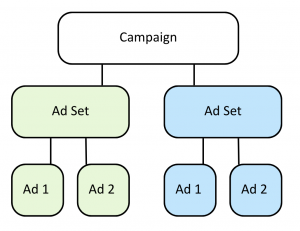
Meta Ads Manager uses three layers:
1. Campaign – Where you set your objective (awareness, traffic, leads, sales).
2. Ad Set – Where you choose your audience, budget, schedule, and placements.
3. Ad – The creative: your images, videos, headlines, and copy.
Choosing the right campaign objective
Picking the right objective matters:
– Awareness – Reach new audiences.
– Traffic – Drive people to your website.
– Engagement – Boost likes, shares, or video views.
– Leads – Collect customer details via instant forms.
– Sales/Conversions – Drive online purchases or enquiries.
Audience targeting options
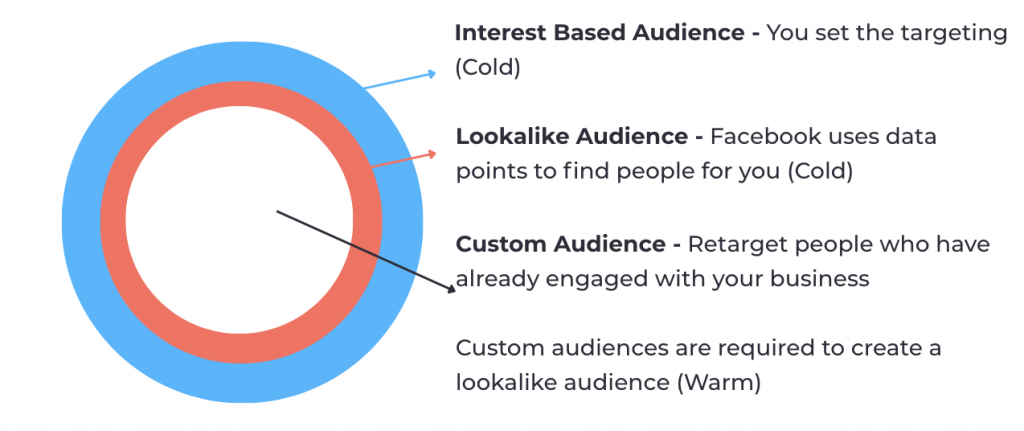
Meta gives you three powerful audience types:
Interest Based Audiences – Filter by demographics, location, and interests.
Custom Audiences – Retarget website visitors, email lists, or past customers.
Lookalike Audiences – Find new people similar to your best customers.
Creative that converts: Building Ads people actually click
The creative side of Meta Ads is what your audience sees and interacts with. Strong creative makes the difference between scroll-past and click-through.
Best practices for 2026 creative:
– Short-form video – Reels and Stories dominate.
– Bold visuals – stand out in busy feeds.
– Clear CTAs – tell people what to do next.
– Social proof – use testimonials, UGC, or case studies.
Budgets & bidding: What you really need to spend
One of the biggest myths is that Meta Ads require huge budgets. In reality, you can start small.
– Testing phase – start with £5–£20/day per ad set.
– Scaling phase – increase budgets on top performers.
– Bidding models – choose between lowest cost, cost cap, or manual bidding depending on your goals.
The trick is consistency. Spikes in spend rarely work as well as steady investment paired with ongoing optimisation.
Tech essentials: Pixel, Conversions API & tracking setup
Before running any ads, get your tech foundations right.
– Meta Pixel – a snippet of code that tracks visitor actions on your site (purchases, form submissions, clicks).
– Conversions API (CAPI) – sends data directly from your server to Meta, bypassing browser limitations and improving tracking accuracy.
Without these tools, you’ll only see surface-level metrics like clicks. With them, you’ll know which ads generate real leads or sales and you can retarget users who didn’t convert the first time.
Measuring success: Key metrics that matter
Install the Meta Pixel or Conversions API to track website actions. Key metrics include:
– CTR (Click-Through Rate) – Shows how engaging your ad is.
– CPC (Cost Per Click) – Reveals cost efficiency.
– Conversion Rate – Tracks how many people take action.
– ROAS (Return on Ad Spend) – Measures profitability.
What’s next: The future of Meta Ads and AI automation
Looking ahead, Meta is investing heavily in AI-driven automation. Expect:
– Smarter campaign optimisation with less manual input.
– Better creative suggestions generated by AI.
– Improved integration with e-commerce platforms.
– More emphasis on privacy-compliant tracking.
Businesses that adopt AI tools early will be better positioned to compete.
Making Meta Ads work for your brand
Meta Ads in 2026 aren’t just about throwing money at Facebook or Instagram, they’re about strategy, targeting, creative, and measurement. With the right setup, you can run cost-effective campaigns that bring in leads and sales consistently.
The businesses winning today are the ones who build strong foundations: correct tech setup, aligned objectives, and a willingness to test and refine.
15 Questions Answered for Google Ads Success
15 Questions answered for Google Ads success
Published 01/02/2026
Google Ads can feel overwhelming, especially for beginners or small businesses trying to make the most of their ad spend. Many businesses have the same questions when starting out or trying to optimise their campaigns.
In this guide, we’ve gathered 15 of the most frequently asked questions about Google Ads and provided some answers, to try and help you out. Whether you’re just starting out or refining your campaigns, this blog will serve as your go to reference.
1. What’s the best Google Ads campaign type for a small business?
The most effective campaign type depends on the advertiser’s goals. For businesses seeking local leads, Search campaigns are typically the best choice, as they capture high-intent searches. For e-commerce companies, Performance Max campaigns often deliver the strongest results. When the objective is brand awareness, Display or YouTube campaigns can help reach a wider audience. It’s generally recommended to start with a single campaign type, measure performance, and expand from there.
I was working with a client in the electrical industry who told me he was now getting lots of leads through Google Search now. He had never run ads before, but we set up a highly targeted Search ad, so customers could easily find him by searching terms like ‘Electrician Crewe’ and ‘EV charging installation Crewe’.
2. How much budget should I spend on Google Ads?
There’s no one-size-fits-all budget. Instead, base it on your cost per click (CPC) in your industry and how many leads or sales you want and make sure that is relevant to what you are trying to get your customer to buy.
For example, I recently worked with a client who was trying to get long term, high value sales from a very small budget. It was never going to be successful. The client needed to increase their budget to compete in a competitive market.
I suggest thinking about the average CPC, so if the average CPC is £4 and you want 100 clicks per month, your budget should be at least £400. Use Google Keyword Planner to estimate costs.
3. What keywords should I target for my business?
There are various keywords that you can use, including broad match, phrase match and exact match keywords.
When working with clients, I always suggest starting with exact match keywords. For example, if you’re a plumber, you might target ‘emergency plumber [location] or ‘gas engineer [location]. Use Google Keyword Planner to refine your list.
4. What’s the difference between broad match, phrase match and exact match keywords?
Broad Match: Shows ads for related searches, even loosely connected. For example, if your keyword is ‘plumber services’, your ad could show for searches like ‘fix leaking pipe’ or ‘local plumber near me’. This match type gives the widest reach but can also waste spend if not monitored closely.
Phrase Match: Ads show when the query includes your phrase in the same order, but words can appear before or after. For example, ‘emergency plumber’ could trigger ads for ‘affordable emergency plumber near me’. This provides a balance between reach and relevance.
Exact Match: Ads only show when the exact keyword (or close variations) is searched. For example, ‘emergency plumber Manchester’ would only trigger ads for that exact intent. Although not as ‘exact’ as it used to be, this is the most targeted option, ensuring high relevance but with limited reach.
For more detail, check the official Google documentation on keyword match types.
5. How do I write Google Ads headlines that get clicks?
Effective headlines are short, clear, and highlight a benefit. Here are some things that I would recommend including:
– Numbers: Save 20% On [service] Today
– Urgency: Book Before Midnight For Free Delivery
– Trust Signals: Rated #1 in [Location] On Trustpilot
Always make sure you keep within the 30-character limit and test multiple variations.
6. How do I create a Google Ads strategy for my business?
A good strategy typically includes:
– Campaign goal (sales, leads, awareness)
– Targeted, thoroughly researched keywords
– Audience targeting
– Ad copy aligned to the customer journey
– Budget and bidding strategy
– Landing page optimised for conversions
– Mobile optimised website
– Landing page that is aligned to ad copy
Success comes from ongoing testing and optimisation.
7. What are the pros and cons of Performance Max vs Search Campaign?
When it comes to choosing between Performance Max and Search campaigns, both offer unique advantages depending on your goals.
Performance Max campaigns are designed to cover all of Google’s advertising inventory-Search, Display, YouTube and Gmail, making them a great option for broad reach and visibility. However, the trade-off is reduced control over targeting, as Google’s automation does most of the heavy lifting.
Search campaigns focus on high intent traffic. Due to the fact they’re keyword-based, they allow for precise targeting, ensuring your ads show up exactly where someone is actively searching for your product or service. The downside is their limited reach compared to Performance Max. In many cases, the best approach is a mix of both: Search for intent-driven leads and Performance Max for brand exposure and scaling.
8. How do I reduce cost-per-click (CPC) in Google Ads?
Lowering your CPC is all about improving your Quality Score. The better your ad relevance, the less you will pay for clicks. To achieve this, make sure your keywords closely align with your ad copy, and that your ads are highly relevant to the user’s search intent. Your landing pages should also be well optimised, fast-loading, and user-friendly. Google rewards a strong customer journey.
For example, if you provide a luxury trade service, you don’t want to attract users searching for ‘cheap’, ‘DIY’ or ‘jobs’. Adding these as negative keywords filters out unqualified clicks, helping you spend more efficiently on the traffic that truly matters.
9. What bidding strategy should I use for my goals?
Selecting the best bidding strategy comes down to your campaign objective and how much historical data you have available. If your goal is lead generation and you’ve set up conversion tracking, Maximise Conversions is a strong choice. Google will automatically adjust bids to bring in the most leads within your budget. For example, a local landscaper could use this to encourage form submissions for free consultations.
If you run an e-commerce store with steady sales data, Target ROAS (Return on Ad Spend) is ideal. Let’s say an online clothing brand sets a target ROAS of 400% (spend £1, earn £4). Google will then prioritise traffic that’s most likely to achieve that return. Meanwhile, Maximise Clicks can be a useful strategy for building visibility and driving traffic, especially for brand awareness campaigns. A new restaurant, for instance, might use it to attract as many visitors as possible to their website before opening night.
For advertisers who want complete control, Manual CPC allows you to set your own bids on each keyword. This approach works well for niche businesses with limited budgets who want to carefully balance spend between high-value and generic terms. For example, a B2B company might bid more on ‘industrial safety software provider’ while keeping lower bids on broader phrases.
If you’re new to Google Ads, start simple with Maximise Conversions (with conversion tracking in place) or Maximise Clicks to build initial data. As your campaigns mature and you gather more insights, you can graduate to more advanced bidding strategies.
10. How do I structure ad groups for industry/service?
Ad groups should always be tightly focused and highly relevant. Each ad group should centre around one specific product or service category so that the keywords, ad copy, and landing page all work together seamlessly.
For example, instead of having everything in one campaign, an electrician might create separate ad groups for “house rewires,” “EV charging installation,” and “exterior lighting.” This structure makes your ads more relevant to searchers, improves Quality Score, and ultimately reduces wasted spend by ensuring the right message is shown to the right audience.
11. How do I analyse my Google Ads report and find improvements?
One of the biggest advantages of Google Ads is the wealth of data at your fingertips, but it only helps if you know how to interpret it.
– Click Through Rate (CTR): Low CTR means your ad copy isn’t resonating.
– Cost Per Click (CPC): High CPC may require better targeting or quality score.
– Conversion Rate: If clicks don’t convert, improve your landing page.
- Impression Share: If low, increase bids or budget.
12. What are common mistakes businesses make with Google Ads?
One of the biggest is relying too heavily on broad match keywords. For example, a local plumber might bid on the word ‘plumbing’ and end up showing ads for ‘plumbing jobs’ which would attract job seekers instead of customers who actually need repairs. This not only wastes money but also clutters campaigns with irrelevant clicks and skew data.
Another pitfall is not setting up conversion tracking. Imagine a landscaping company seeing hundreds of clicks on its ads but having no idea if those clicks turned into leads. Without that data, they could be overspending on ads that don’t actually bring in work.
Similarly, sending ad traffic to your homepage instead of a tailored landing page is a conversion killer. Take an electrician who runs ads for ‘emergency electrical repairs’ but sends people to their homepage full of general information and multiple services – the urgency is lost and potential customers could bounce off the website.
Not using negative keywords is another budget drain. A roofer targeting ‘roof repair’ might accidentally show up for ‘DIY roof repair kits’, which won’t ever bring in paying leads.
Finally, not testing different ad variations could potentially be leaving money on the table. A window company sticking with one generic ad like ‘Professional Window Installers’ misses the chance to test stronger versions such as ‘Energy Efficient Windows Installed in 7 Days’, which could attract far more clicks and lower costs.
13. How do I set up conversion tracking for Google Ads?
One of the most important steps in setting up Google Ads is enabling conversion tracking. Without tracking, you’ll never know which ads are working and which ones are wasting budget. You can set tracking up either by using Google Tag Manager or by installing the Google Ads conversion tracking code directly onto your site.
Once tracking is in place, you can track meaningful actions such as form submissions, phone calls or completed purchases, depending on your goals. Analysing this data, allows you to optimise campaigns, adjust bids, and scale the ads that actually bring results. Without conversion tracking, you are literally flying blind. For example, you might see clicks coming in, but you have no visibility on whether those clicks are turning in to real leads or sales.
14. What ad extensions should I use?
To make your ads more engaging, ad extensions are a must. Most businesses will benefit from using a combination of these features:
– Sitelinks: let you add direct links to key pages like your services or contact page, guiding customers straight to the information they need.
– Callouts: perfect for highlighting unique selling points such as ‘free estimates’, or ‘24/7 support’, helping you to stand out from competitors.
– Structured snippers: you can display your product or service categories, giving searchers a quick snapshot of what you offer.
– Call extensions: make it simple for customers to get in touch by adding your phone number directly into the ad.
15. How do I target local customers using Google Ads?
If you are trying to attract more local customers, start by setting up location targeting so your ads only show in the towns, cities or postcodes you actually cover. This prevents wasted spend on clicks from people outside your reach.
You should also use location-specific keywords such as ‘plumber in Manchester’ or ‘electrician in Stockport’ to ensure your ads appear for high-intent local searches.
How to use blogging to get found in AI search
How to Use Blogging to Get Found in AI Search
Guest post by Michelle Eshkeri, professional services copywriter at Let ME Write
Published 31/08/2025
My blogging client Robert, an accountant at Green & Peter, told me a few days ago that he’s getting lots of enquiries through AI search now. We’re witnessing a fundamental shift in how people search for businesses and suppliers. Instead of typing ‘accountant North London’ into Google or Bing and scrolling through pages of results, they’re asking ChatGPT, Claude, or Perplexity: ‘Find me an accountant in North London who specialises in creative businesses.’ The AI results recommend specific firms based on the content it has analysed across the web.
This shift isn’t coming next month or next year; it’s already here. For businesses who’ve relied on traditional SEO for traffic, this represents both a massive opportunity and a potential threat.
In this guide, I’ll show you exactly how to optimise your blogging strategy so when someone asks an AI tool to recommend a professional in your field, your name pops up as the first obvious choice.
Understanding AI search vs traditional search
How traditional SEO works
Traditional search engine optimisation has been the foundation of digital marketing for years. You research keywords, optimise your content around those specific terms, build backlinks, and hope to appear on the first page of Google search engine results (also known as SERP). Success is measured by rankings or where you appear when someone searches for ‘mortgage broker Manchester’ or ‘tax accountant small business.’
The SEO game has always been about matching keywords and pleasing the algorithm overlords. You’d write content targeting “best pension advice” or ‘self-employed tax tips’, ensuring these phrases appeared in your headings, meta descriptions, and throughout your text. Google would crawl your pages, assess their relevance and authority, and slot you into position 3, 7, or hopefully 1 for your target terms. Job done.
How AI search optimisation works differently
AI search operates on different principles. When someone asks ChatGPT ‘Who should I speak to about pension planning for freelancers?’, the AI doesn’t just match keywords. Instead, it collates and synthesises information from across the web, considering context, expertise, and relevance before making a recommendation.
The AI evaluates the depth of your knowledge, the specificity of your expertise, and how well you’ve demonstrated your ability to solve similar problems. It looks for evidence of real-world experience, client success stories, testimonials and comprehensive understanding of the subject matter.
Rather than presenting a list of links for users to evaluate themselves, AI tools provide direct recommendations with explanations.
Why this matters for your business
This shift changes everything about how potential clients discover and evaluate potential suppliers. AI search users aren’t browsing through multiple websites to compare options anymore. In some cases, they aren’t even clicking through to your website at all. They’re getting curated recommendations from a tool they feel they can trust. When an AI recommends your firm, it brings context and built-in credibility (rightly or wrongly, depending on your viewpoint).
And more importantly, these users are typically further along in their decision-making process. They’re looking for specific solutions to identified problems – in other words they are bottom of the marketing funnel and much closer to that all-important buying decision. This means higher conversion rates and more qualified enquiries -exactly what Robert has been experiencing with his accountancy practice.
The foundation of what AI tools look for
Authority and expertise signals
As I mentioned before, AI tools evaluate the depth and authenticity of your expertise rather than simply scanning for keywords. This means you need to be consistently publishing in-depth content that covers your specialist area comprehensively. When I optimise blogs for clients, I ensure they demonstrate real-world experience through specific examples, client case studies (anonymised, of course), and detailed explanations that only someone with genuine expertise could provide.
For instance, rather than writing a generic ‘pension planning tips’ post, a financial advisor should share insights from actual client scenarios: ‘Recently, I helped a 45-year-old freelance graphic designer who’d never paid into a pension. Here’s the strategy we developed…’ This kind of content signals to AI tools that you’re sharing genuine professional experience rather than simply regurgitating generic tips.
Context and relevance
AI tools are top notch at understanding context. They recognise when your content addresses specific niches, locations, or situations. If you’re a mortgage broker in Manchester specialising in first-time buyers, your content should reflect this specificity. Write about local market conditions, amenities and communities, reference local estate agents you work with, and address the particular challenges Manchester first-time buyers face.
The AI understands that someone asking ‘find me a mortgage broker who understands the Manchester property market’ needs location-specific expertise, not generic mortgage advice.
Fresh, current information
AI tools prefer recent, up-to-date content because they’re designed to provide current information. So, it’s even more important now to regularly update existing content with fresh examples, recent regulatory changes, and current market conditions. A blog about corporation tax rates written in 2022 needs updating for 2025 changes to remain valuable to AI search algorithms.
Content strategies that work for AI search
Write for conversational queries
People don’t type ‘mortgage broker services Manchester’ into ChatGPT like they would with Google. Instead, they’re having a conversation with the AI, asking, ‘Who’s the best mortgage broker in Manchester for someone with a low deposit?’ Your content needs to address these natural, conversational queries. Instead of optimising for ‘pension advice,’ write content that answers ‘How much should I be putting into my pension at age 35?’
Start by listing the actual questions your clients ask during consultations. These real-world queries are exactly what people are asking AI tools. Transform each question into comprehensive content that provides thorough answers.
Create comprehensive, authoritative content
AI tools prefer depth over breadth. Rather than writing ten 300-word posts about different aspects of tax planning, create one comprehensive 2,000-word guide that covers everything a small business owner needs to know about tax planning. Include multiple scenarios, address common misconceptions, and provide step-by-step guidance.
This approach serves two purposes: it demonstrates your expertise more effectively, and it gives AI tools substantial content to analyse and cite. When someone asks for tax advice, the AI can recommend your comprehensive guide with confidence.
Focus on problem-solution content
Structure your content around specific client problems and detailed solutions. Write about ‘How I helped a contractor avoid IR35 issues when their client wanted to extend their contract.’ Include the problem, your approach, the solution, and the outcome.
This format works because AI tools are trying to match user problems with proven solutions. When you demonstrate that you’ve successfully solved similar problems, you become the obvious recommendation.
Use the ‘Query Fan-Out’ strategy
When someone asks an AI tool ‘Should I remortgage?’, the AI breaks the query into related sub-questions: ‘What are current interest rates?’ ‘What are the costs involved?’ ‘How do I know if it’s the right time?’ ‘What documents will I need?’ You’ve probably noticed that AI is always looking to continue the conversation with you.
Create content clusters that address every angle of your core topics. This comprehensive coverage increases your chances of being recommended regardless of how someone phrases their query.
Demonstrate local expertise
AI tools understand geographical relevance too. If you’re an estate agent based in Edinburgh, include content about Scottish property law differences, local market trends, and region-specific considerations. Reference local landmarks, business districts, and community issues that resonate with your target audience.
This local specificity helps AI tools recommend you for location-based queries while also building trust with potential clients who recognise your genuine understanding of their area.
Technical optimisation for AI search
Content structures AI understands
AI tools process information more effectively when it’s clearly structured. Use descriptive headings that summarise each section’s content. Instead of ‘Section 1’ or ‘Part A,’ use ‘Understanding Buy-To-Let Mortgage Requirements’ or ‘How to Calculate Rental Yield.’ These headings helps AI tools understand your content’s hierarchy and purpose.
Break up long paragraphs with bullet points and numbered lists for key information. Create bite-sized summaries that AI can easily cite in its answers to user questions. When explaining a process, use step-by-step formatting. AI tools often extract this structured information directly when providing recommendations and can show up in Google AI summaries too.
The importance of context
Never assume knowledge. Explain industry acronyms (BTL means Buy-to-Let), provide background information, and connect concepts clearly. AI tools need this context to understand when your content is relevant. If you mention ‘stamp duty changes,’ explain what stamp duty is and how the changes affect different buyer categories.
This approach also improves user experience. Someone asking an AI tool for financial advice may not be familiar with industry terminology.
Building brand mentions and authority
Why brand mentions matter more than backlinks
Traditional SEO focused heavily on getting other websites to link to yours. AI search operates differently, so it looks for contextual mentions of your brand across the web. When industry publications mention your expertise, when clients reference your services in forums, or when colleagues cite your insights, AI tools interpret these as authority signals.
Quality matters more than quantity. One mention in a respected industry publication carries more weight than dozens of generic directory listings. AI tools evaluate the context surrounding your brand mentions. They are looking to see if you’re being referenced as an expert, a solution provider, or a trusted advisor.
Strategies for building mentions
Getting brand mentions can be challenging though. Focus on thought leadership activities that naturally generate brand mentions. Write guest articles for industry publications, speak at professional events, and participate in industry panels. Collaborate with complementary professionals. For example, accountants can partner with financial advisors, mortgage brokers can work with estate agents.
Build relationships with trade journalists and industry bloggers. When they write about market trends or regulatory changes, you want to be the expert they quote. Offer insights for industry surveys and research reports as these often generate multiple mentions across various platforms.
Measuring success in AI search
Tracking AI-generated traffic
Identifying AI-driven traffic requires looking beyond traditional referral sources. Monitor direct traffic increases because people who’ve been recommended by AI tools often visit your website directly. Look for visitors who land on specific service pages rather than your homepage, as AI tools often recommend specific content.
Key metrics to watch
Focus on lead quality rather than just quantity. AI-recommended prospects typically arrive with a clearer understanding of their needs and your expertise. They are more ready to buy. Track conversion rates from initial enquiry to consultation, and from consultation to client.
Monitor the specificity of incoming enquiries. AI-recommended leads often reference particular services or expertise areas, indicating they’ve received targeted recommendations rather than generic suggestions.
Your AI search blogging plan
Start with one comprehensive piece of content that demonstrates your expertise in your core service area. Make it thorough, specific, and genuinely helpful. Then build systematically, creating content clusters that address every aspect of your specialty.
Remember, this is about genuinely demonstrating your expertise in a way that AI tools can understand and recommend. The same content that works for AI search also builds trust with human prospects and establishes your authority in your field, so it can also work well for traditional SEO where Google is looking for Expertise, Experience, Authority and Trust (E-E-A-T).
Ready to start optimising your content for AI search? My AI-assisted content packages help professional services businesses, especially those in finance, create the comprehensive, authoritative content that AI tools recommend.
Frequently Asked Questions
Q: How long does it take to see results from AI search optimisation? A: Unlike traditional SEO which can take 3-6 months, AI search optimisation often shows results more quickly. I’ve seen clients like Robert getting AI-generated enquiries within 4-6 weeks of publishing comprehensive, expert content. However, building consistent authority takes 3-4 months of regular, high-quality content publication.
Q: Do I need to stop doing traditional SEO if I’m optimising for AI search? A: Absolutely not. AI search optimisation builds upon good SEO foundations. The same comprehensive, expert content that AI tools recommend also ranks well in traditional search engines. Think of AI optimisation as an enhancement to, not a replacement for, your existing SEO strategy.
Q: What’s the difference between AI search optimisation and regular content marketing? A: AI search optimisation requires deeper, more comprehensive content that demonstrates genuine expertise through real examples and case studies. While traditional content marketing might focus on keywords and search volume, AI optimisation prioritises authority, context, and problem-solving depth that AI tools can confidently recommend.
Q: How do I know if my content is working for AI search? A: Monitor direct traffic increases, branded search growth, and the quality of enquiries you receive. Prospects who find you through AI search often arrive with specific questions and a clearer understanding of your expertise. Track how enquiries reference your specific services or knowledge areas mentioned in your content.
Q: Can small businesses compete with larger companies in AI search? A: Yes, and often more effectively. AI tools favour specific expertise over company size. A small firm that consistently demonstrates deep knowledge in a particular niche can outperform larger generalist firms in AI recommendations for their specialty area.
Q: Should I write about the same topics my competitors are covering? A: Write about the same broad topics but from your unique perspective and with your specific expertise. If competitors write generically about ‘pension planning’, you might focus on ‘pension planning for creative freelancers’ or share detailed case studies that only you could write based on your client experience.
Q: How often should I publish content for AI search optimisation? A: Consistency matters more than frequency. Publishing one comprehensive, expert piece monthly is better than several shallow posts weekly. Focus on creating substantial content (1,000+ words) that thoroughly addresses client problems and demonstrates your expertise through real examples and detailed solutions.
Michelle Eshkeri is a content and copywriter specialising in financial services, with 23 years of finance industry experience including 18 years at GSK plc. She helps accountants, financial advisors, and mortgage brokers create AI-optimised content that gets recommended by ChatGPT, Claude, and other AI tools, combining traditional expertise with cutting-edge AI-assisted content strategies.
What It’s Like Working With a Digital Marketing Agency as a Trade Business
What it’s like working with a digital marketing agency as a trade business
Guest post by OHM Electrical
Published 01/07/2025
As electricians, we’re used to working with cables, circuits, and customer call-outs — not clicks, conversions, and campaigns. When we first considered getting help with our digital marketing, we didn’t quite know what to expect.
But working with Co Thought Digital has been a game changer for our business. If you’re a trade or home improvement company thinking about getting support with your marketing, here’s what we’ve learned and why we’d recommend partnering with a specialist agency.
Why we decided to work with a digital agency
We were already doing decent work through word-of-mouth, but we knew we were missing out on potential customers online. Our website wasn’t bringing in many enquiries, and we weren’t making the most of platforms like Google or Facebook for lead generation.
We didn’t have the time (or headspace) to figure it all out ourselves, so we reached out to Co Thought Digital to help us build a strategy that actually works.
What it’s like working with Co Thought Digital
From the start, it felt like they really got trades. There was no technical jargon but just clear advice and tailored support that made sense for our business.
They helped us:
– Get clearer on who we’re targeting
– Set up Meta Ads to promote specific services like consumer unit upgrades
– Track where our leads were coming from
– Understand how SEO and Google Ads work together with Meta Ads
Everything was explained simply and it quickly felt like a true partnership rather than just outsourcing work.
What’s changed since we started?
Since working together, we’ve seen real improvements in our marketing results:
– More consistent enquiries through website and social media
– Better targeting in the areas we wanted to grow
– Clear tracking systems so we know exactly what’s working
It’s not just about the ads, it’s about having a strategy that supports your business long-term.
Our advice for other trades
If you’re on the fence about working with a digital agency, here’s our simple advice:
– Choose someone who genuinely understands trades
– Don’t try to do everything yourself
– Invest in expertise so you can focus on the work you do best
There’s no shame in outsourcing the things you don’t have time for, especially when the results speak for themselves.
OHM Electrical is a trusted electrical contractor based in Cheshire, specialising in residential and commercial installations, consumer unit upgrades, and energy-efficient lighting solutions. Known for their reliability and high-quality workmanship, they serve homeowners and businesses across Staffordshire and Cheshire.
How to Improve Ad Rank in Google Ads
How to improve Ad Rank in Google Ads?
(without just spending more)
Published 16/08/2025
If your ads aren’t showing at the top of Google or worse, not showing at all, you’ve probably asked yourself:
“How to improve Ad Rank in Google Ads?”
Ad Rank determines where and if your ads appear in Google Search results. A low Ad Rank means fewer clicks, wasted budget, and lost leads. But here’s the good news: you can improve Ad Rank without increasing your budget – you just need the right strategy.
In this guide, we’ll explain:
– What Ad Rank is
– How it’s calculated
– And most importantly, how to improve Ad Rank in Google Ads to get better results from your campaigns.

What is Ad Rank in Google Ads?
Ad Rank is Google’s formula for deciding where your ad shows on the search results page—and whether it appears at all.
It’s based on several key factors:
– Your bid – What you’re willing to pay per click
– Ad quality – Includes relevance, expected click-through rate (CTR), and landing page experience
– Ad extensions – Extra features like site links or call buttons
– Auction competitiveness – Who else is bidding on the same terms
– Context of the search – The user’s device, location, time of day, etc.
Even if a competitor bids more, you can outrank them with a higher-quality ad.
Why does Ad Rank matter?
A higher Ad Rank can lead to:
– Better ad positions (closer to the top of the page)
– Lower cost per click (CPC)
– More visibility and conversions
If your Ad Rank is too low, your ad might not appear at all—or you’ll pay more for every click. Either way, it hurts your performance.
How to improve Ad Rank in Google Ads
Now for the good stuff. Let’s walk through how to improve Ad Rank in Google Ads, step-by-step.
1. Improve your Quality Score
Google gives each keyword a Quality Score from 1 to 10. The higher the score, the better your Ad Rank.
Focus on:
– Ad relevance – Make sure your ads match the keywords you’re targeting
– Landing page experience – Keep it fast, mobile-friendly, and on-topic
– Expected CTR – Write compelling, click-worthy ad copy
Pro tip: Use dynamic keyword insertion to increase relevance and boost your expected CTR.
2. Use more relevant keywords
A clean keyword list = a stronger campaign.
– Audit regularly and remove low performers
– Focus on long-tail keywords for better targeting
– Use exact and phrase match for tighter control
– Add negative keywords to avoid irrelevant clicks
The more relevant your keywords, the more Google will reward your ads with better Ad Rank.
3. Optimise your ad copy for clicks
To lift your Ad Rank, you need higher expected click-through rates.
Craft ads that:
– Include your main keyword in the headline
– Speak directly to user intent
– Offer a clear value proposition
– Have a strong call to action
Split-test multiple versions to find what resonates most with your audience.
4. Use all relevant Ad Extensions
Ad extensions = bigger, more valuable ads and better Ad Rank.
Add:
– Sitelinks – Link to more pages on your site
– Callouts – Feature perks like “Free Delivery” or “Rated 5 Stars”
– Structured snippets – Highlight services or categories
– Call extensions – Let users call you straight from the ad
More info = better user experience = better Ad Rank.
5. Create a high-quality landing page
The experience after the click matters too.
To improve your landing page experience:
– Ensure fast load speed (under 3 seconds)
– Make it mobile-optimised
– Keep the messaging aligned with your ad
– Include one clear call to action
A poor landing page will drag down your Quality Score and your Ad Rank.
6. Adjust your bids intelligently
Yes, Ad Rank isn’t just about bids, but they still count.
Use automated bidding if you’re managing multiple campaigns
– Increase bids on high-converting keywords
– Reduce bids on under-performers
Don’t just throw money at it, pair bids with better quality and targeting
7. Monitor & optimise regularly
Ad Rank fluctuates with every auction. Keep your campaigns healthy by:
– Reviewing performance weekly or bi-weekly
– Monitoring Quality Scores
– Testing new ad copy and extensions
– Adding negative keywords to improve targeting
The key to improving Ad Rank over time? Consistent optimisation.
Improving Ad Rank is about strategy, not spend
If you’re still asking “How to improve Ad Rank in Google Ads?”, remember, it’s not about outspending the competition. It’s about outsmarting them.
With better keywords, more relevant ads, improved landing pages, and smart bid strategies, you can climb the rankings, increase clicks, and lower your costs.
Tired of second-guessing your way through Google Ads? Let’s change that.
Co Thought Digital specialises in smart Google Ads strategies that improve Ad Rank, reduce wasted spend, and drive more leads for your business.
Do Google Ads Work? What Small Businesses Need to Know
Do Google Ads Work? What Small Businesses Need to Know
Do Google Ads Work?
What Small Businesses Need to Know
If you’re a small business owner wondering, “Do Google Ads work?” then you’re not alone. With so many marketing options out there, it’s completely fair to ask whether putting your budget into paid ads will actually generate results.
The short answer? Yes, Google Ads do work, but only when they’re set up strategically, with proper targeting and ongoing optimisation.
In this blog, we’ll explore exactly why Google Ads work, how they benefit small businesses, and what to know before getting started.
Why Do Google Ads Work So Well?
Here’s why Google Ads work:
1. High Buyer Intent
People using Google are actively searching for a solution. When someone types “emergency plumber in Crewe” or “wedding photographer near me,” they’re ready to act. Google Ads puts your business directly in front of those ready to buy customers.
2. Instant Visibility
Unlike SEO, which can take months to show results, Google Ads can bring traffic to your website within hours. If you’re launching a new product or want to boost bookings fast, this matters.
3. Budget Control
You can set daily and monthly limits, making it ideal for small businesses with tighter marketing budgets. You’re in control and you can pause or adjust at any time.
4. Hyper-Targeted Ads
You can target your ideal audience by location, device, keywords, demographics, and even the time of day. This ensures your ads are shown to the right people at the right time.
5. Trackable Results
Google Ads provides data on every click, impression, and conversion. That means you can measure what’s working and ditch what isn’t, maximising your return on investment.
But… Do Google Ads Work for My Business?
Here are a few signs Google Ads might be right for you:
– You want more leads or sales quickly
– Your business offers local services
– Your website is already converting traffic
– You know your customer’s search habits
– You want to test new markets or products
If you’re still unsure, start with a small budget and test one campaign. Google Ads works best when you focus on one clear goal, whether it’s lead generation, phone calls, or e-commerce sales.
Common Mistakes That Make People Think Google Ads Don’t Work
If you’ve tried Google Ads before and didn’t see results, it doesn’t mean the platform doesn’t work. It likely means something went wrong in the setup. Here are some common issues:
– Poor keyword targeting
– Sending traffic to a slow or unclear landing page
– No conversion tracking set up
– Broad match keywords draining the budget
– Lack of ongoing optimisation
Working with a Google Ads expert (like us at Co Thought Digital) can help you avoid these costly mistakes.
Final Verdict: Do Google Ads Work?
Yes, Google Ads work, but they need to be done right.
If you’re serious about growing your business, Google Ads can give you an edge over your competitors. But they’re not a magic bullet. You need the right strategy, messaging, landing page, and data tracking to make them pay off.
We’re here to help. At Co Thought Digital, we specialise in Google Ads for small businesses. Whether you’re just starting out or need someone to take over the heavy lifting, we can build, manage, and optimise your ads for success.
Facebook or Google Ads? Which is Best for Your Business?
Facebook or Google Ads? Which is best for your business?
Published 01/08/2025
In the ever-evolving world of digital marketing, businesses are presented with countless platforms to reach their target audience. Two of the most popular advertising platforms are Facebook Ads and Google Ads. Both are powerful tools, but choosing the right one for your business depends on your goals, audience, and budget.
In this blog, we’ll break down the key differences between Facebook Ads and Google Ads, their strengths, and how to decide which one is best suited for your business.
Facebook Ads: Building awareness and engagement
Facebook Ads excel in social media marketing by leveraging the platform’s extensive user base and advanced targeting capabilities. With over 2.9 billion active users worldwide, Facebook provides an opportunity to showcase your business to a diverse audience.
Key features of Facebook Ads:
1. Advanced targeting: Facebook allows you to target users based on demographics, interests, behaviours, and even life events. This makes it ideal for reaching highly specific audiences.
2. Visual content: Facebook Ads rely on visually appealing images and videos, making them perfect for businesses that can create engaging visual content.
3. Cost-effective: Facebook Ads are generally less expensive compared to Google Ads, particularly for small budgets.
4. Brand awareness: Ideal for businesses looking to increase visibility and engagement through storytelling.
Facebook Ads are best for:
– E-commerce businesses showcasing products visually.
– Startups looking to build brand awareness.
– Local businesses targeting specific communities.
Limitations of Facebook Ads:
– Not ideal for users actively searching for specific products or services.
– Requires consistent creativity to maintain engagement.
Google Ads: Capturing intent
Google Ads (formerly known as Google AdWords) dominate search engine marketing (SEM) and are designed to capture users who are actively searching for specific products, services, or information. With over 5.6 billion searches daily, Google Ads can connect you with potential customers at the exact moment they express interest.
Key features of Google Ads:
1. Search intent: Google Ads targets users actively searching for keywords related to your business, making it effective for driving conversions.
2. Wide reach: Google Ads include search ads, display ads, YouTube ads, and shopping ads, providing multiple avenues for engagement.
3. Measurable ROI: With detailed analytics, Google Ads offer precise insights into campaign performance, helping you optimise your return on investment.
4. Customisable budgets: You can set daily budgets and bids for specific keywords, making it scalable for businesses of all sizes.
Google Ads are best for:
– Businesses offering solutions to specific problems (e.g., plumbing & electrical services).
– E-commerce companies targeting users ready to make a purchase.
Limitations of Google Ads:
– High competition can drive up costs, especially for competitive keywords.
– Requires expertise in keyword research and campaign management.
Facebook Ads vs. Google Ads:
Facebook Ads:
– Audience targeting: Behavioural and demographic targeting
– Budget: Cost effective for small budgets
– Best for: Building brand awareness
– Ad Format: Visual (images, videos)
– ROI: Long term brand engagement
Google Ads:
– Audience targeting: Search intent and keywords
– Budget: Can be expensive for high demand keywords
– Best for: Driving immediate conversions
– Ad format: Text based (search) and multimedia (YouTube)
– ROI: Short term sales and conversions|
Which platform is right for your business:
The decision between Facebook Ads and Google Ads depends on your business goals:
1. If your goal is brand awareness and audience engagement:
Facebook Ads are ideal for telling your story, showcasing your brand, and creating lasting impressions.
2. If your goal is driving conversions and capturing demand:
Google Ads are perfect for targeting users who are actively searching for your products or services.
3. For businesses with diverse goals:
A combination of both platforms can be incredibly effective. You can use Facebook Ads to build awareness and Google Ads to capture conversions.
Both Facebook Ads and Google Ads are incredibly powerful in their own right, but success lies in understanding your audience and aligning your strategy with your business objectives. Instead of asking, “Which is better?” consider asking, “Which platform aligns better with my goals right now?”
Whether you’re a small business owner, a startup founder, or part of a larger organisation, take time to experiment, analyse, and refine your campaigns. By leveraging the strengths of these platforms, you can maximise your reach, engagement, and conversions.